Typora has no plugin API. The best-known community plugin system, typora_plugin, runs on Windows and Linux only. There Typora is an Electron app, and a plugin can reach Node and the file system from the page. On macOS Typora is a native app built on WKWebView, with no Node inside. Typora Plugin Lite starts from that gap. A short injected loader starts an ES module core, and a platform layer maps file, shell and path calls to Typora’s own bridge on macOS and to Node on Windows and Linux. Plugins never call either directly.
It is for people who write in Typora every day and want a few things it lacks: a file finder that ranks by how you work, code blocks you can copy from, margin notes, adjustable writing width, links between notes. It is also for people who want a script or an agent to read and drive the open note. The remote-control plugin puts a JSON-RPC interface on the local loopback, so an external process can read the document, open files, switch folders and run plugin commands.
- For
- Typora users who want plugins on macOS as well as Windows and Linux, and anyone who wants a script or agent to drive Typora
- Runs on
- macOS (WKWebView), Windows and Linux (Electron); every screenshot here is Typora 1.14.9 for macOS
- Latest
- v0.1.3, 12 August 2026;
mainhas moved on since, as the log below shows - License
- MIT
- Built with
- TypeScript, esbuild, and Node’s own test runner with happy-dom
- Install
- from source with pnpm and Node 22 or later, then the installer for your platform
How it gets into Typora
The installer finds Typora, backs up its window.html, adds one <script> tag for loader.js, and copies the core and the plugins next to it. On macOS that means inside Typora.app, because WKWebView loads file:// scripts only from within the app bundle. The installer then re-signs the bundle so macOS still opens it.
The loader is an IIFE of about 70 lines with comments. It finds its own script tag, works out where it lives, adds core.js as another script tag, and calls bootstrap(). Everything else lives in the core.
graph TD
    App[Typora window.html] --> Loader[loader.js]
    Loader --> Core[core.js]
    Core --> Plat[Platform layer: fs, shell, path]
    Core --> PM[Plugin manager]
    Core --> UI[Plugin Center, toasts]
    Plat --> Mac[macOS: Typora bridge]
    Plat --> Node[Windows and Linux: Node]
    PM --> Plugins[Plugins, each its own ES module]
Plugins load lazily, in the manner of lazy.nvim. Each one declares in its manifest.json when it should start: at startup, on an event, on a command or on a hotkey. Title Shift, which moves headings up or down a level, does nothing until you press its key:
{
  "id": "title-shift",
  "name": "Title Shift",
  "version": "0.1.0",
  "description": "Increase or decrease heading levels",
  "main": "main.js",
  "loading": {
    "startup": false,
    "hotkey": ["Mod+Shift+Up", "Mod+Shift+Down"]
  }
}
The manager binds the hotkey to a stub. The first press loads the module, removes the stub, and replays the key, so the first use behaves like every later one. Settings, logs and caches live outside Typora’s own files, under ~/Library/Application Support/abnerworks.Typora/plugins/data/ on macOS and ~/.local/Typora/data/ on Linux, so a Typora update does not wipe them.
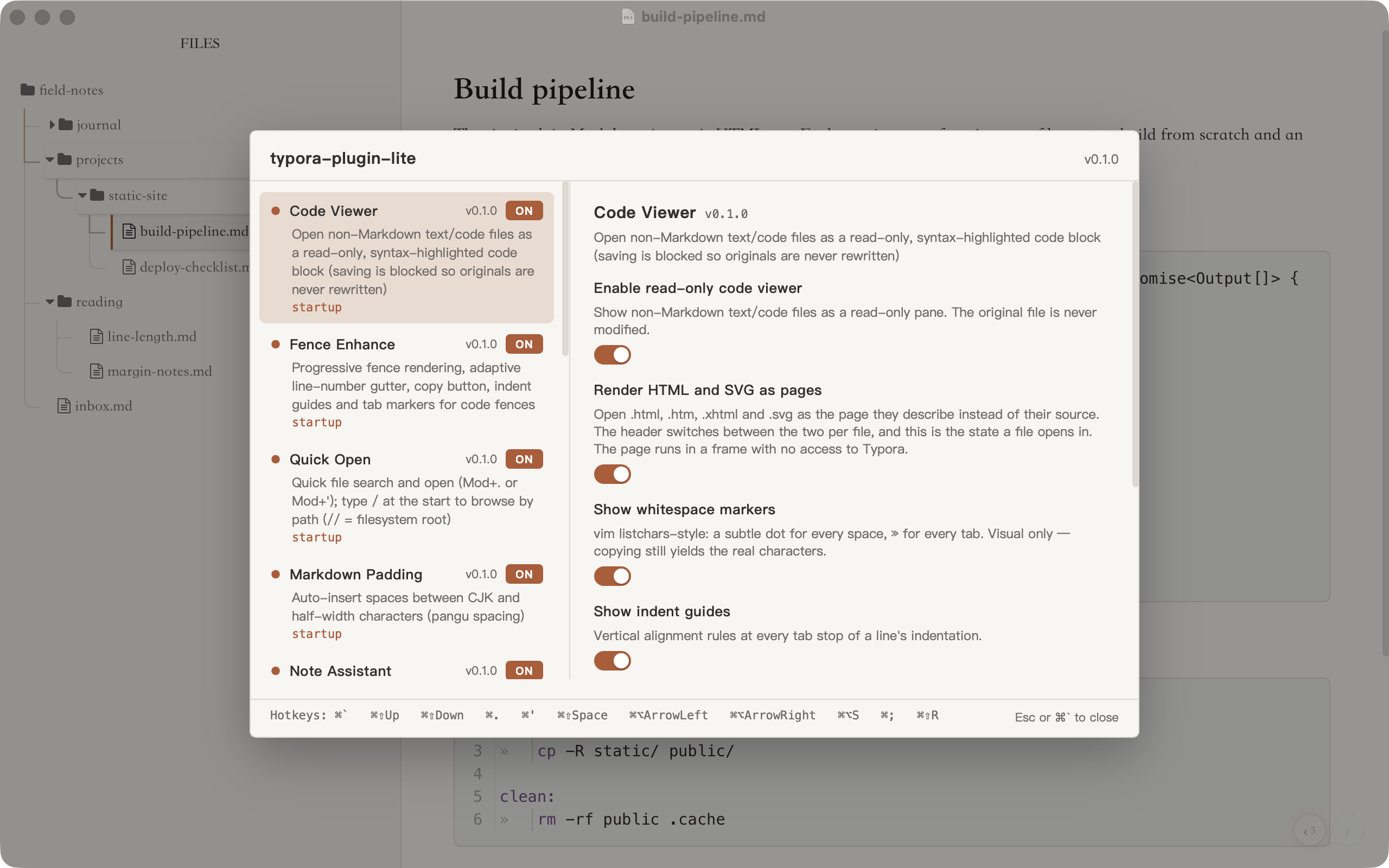
The Plugin Center
Cmd+` opens the Plugin Center, shown at the top of this page. The left column lists every plugin with its version, a switch, and how it loads. The right column shows the selected plugin’s settings. The core draws them from a schema each plugin declares, so a plugin author writes no UI: switches, text and number fields, choices and masked secrets, in groups, with validation and error states. A setting is saved before the panel closes, and a newer value is never overwritten by an older write that finished late. The footer lists every hotkey in use. The panel reads the theme’s --tpl-ui-* colours, so with the Claude-like theme it matches the rest of the window in light and dark.
These are the twelve plugins that ship:
| Plugin | What it does | Loads |
|---|---|---|
| Quick Open | Finds files, folders and text by name, path or content | startup, Cmd+. or Cmd+‘ |
| Fence Enhance | Renders every code block early; line-number gutter, copy button, tab markers, indent guides | startup |
| Code Viewer | Opens non-Markdown text and code files read-only | startup |
| Sidenote | Turns sidenote spans into numbered margin notes in the editor | startup, Cmd+Opt+S |
| Wider | Default, wide and full writing widths | startup, Cmd+[ and Cmd+] |
| Note Assistant | Renders [[wiki-links]] and opens a related-notes palette | startup, Cmd+; |
| Tree Guides | Draws the file tree’s guide lines and lights the branch of the open file | startup |
| Trail | Back and forward across the last notes you visited | startup, Cmd+Alt+← and → |
| Title Shift | Raises or lowers heading levels | Cmd+Shift+↑ and ↓ |
| Markdown Padding | Puts a space between CJK and Latin text | startup, Cmd+Shift+Space |
| Theme Pack | Keeps a theme from GitHub in Typora’s themes folder | startup |
| Remote Control | Loopback JSON-RPC for scripts and agents | startup |
Writing with it
Code blocks
Typora renders only the first eight code blocks of a note up front and leaves the rest grey until you scroll onto them. Fence Enhance renders all of them in the background, top to bottom, so a long technical note does not jump while you scroll.
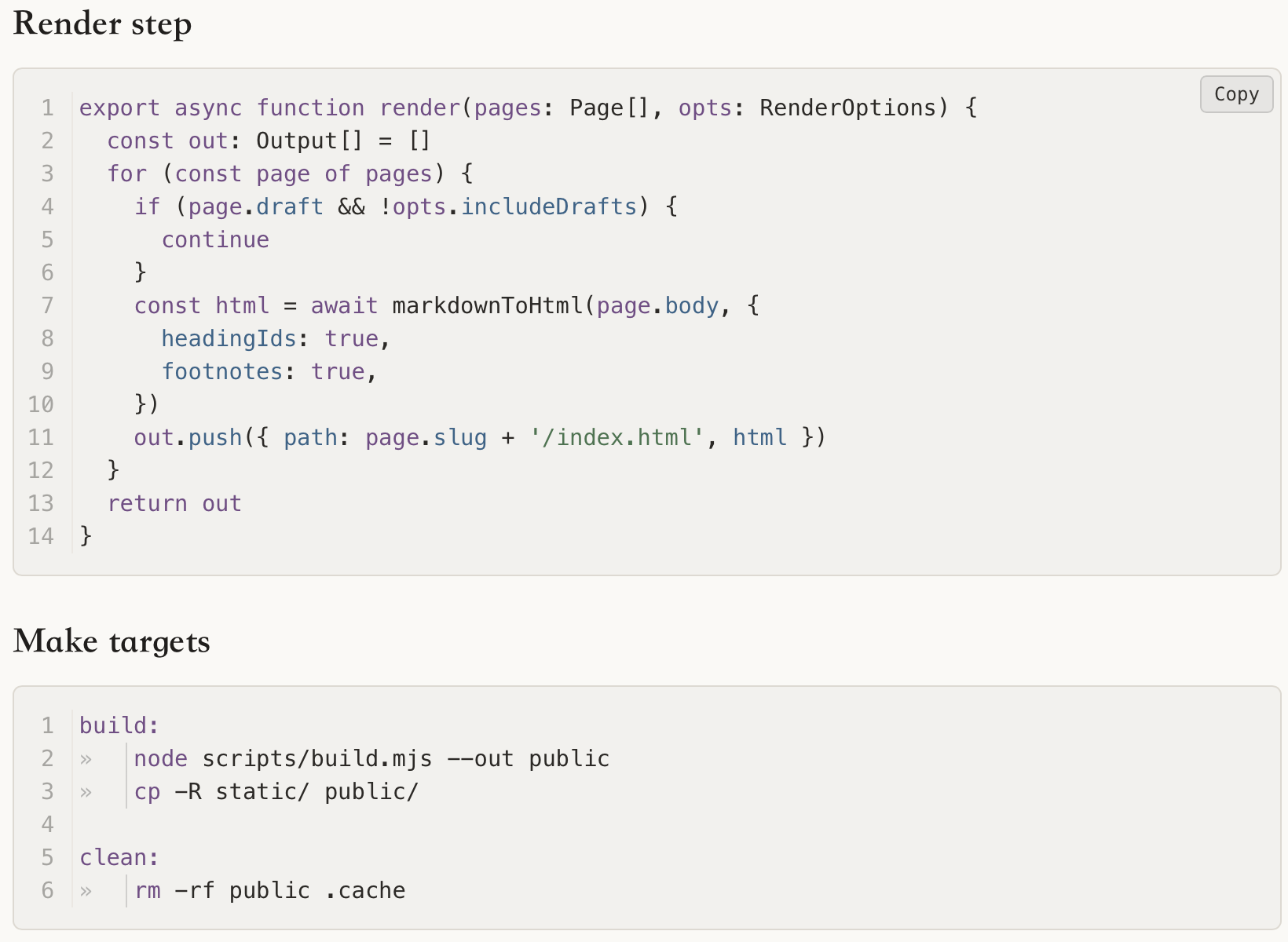
It adds a Copy button, marks tabs and draws indent guides. It also sizes the line-number gutter to each block: a 14-line block gets two digits, a 1,200-line block four. The theme reads that width from a CSS variable the plugin sets.
Writing width
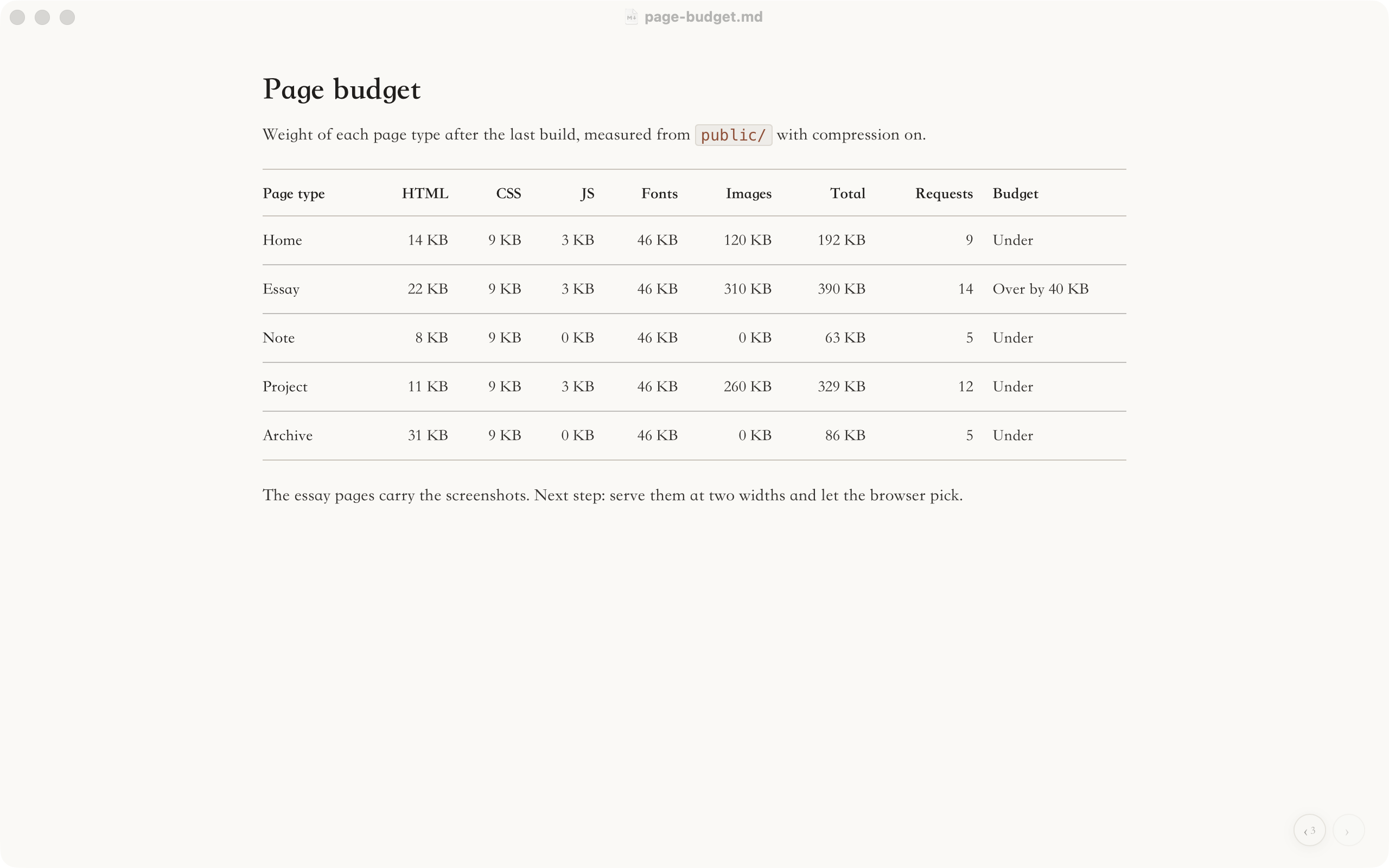
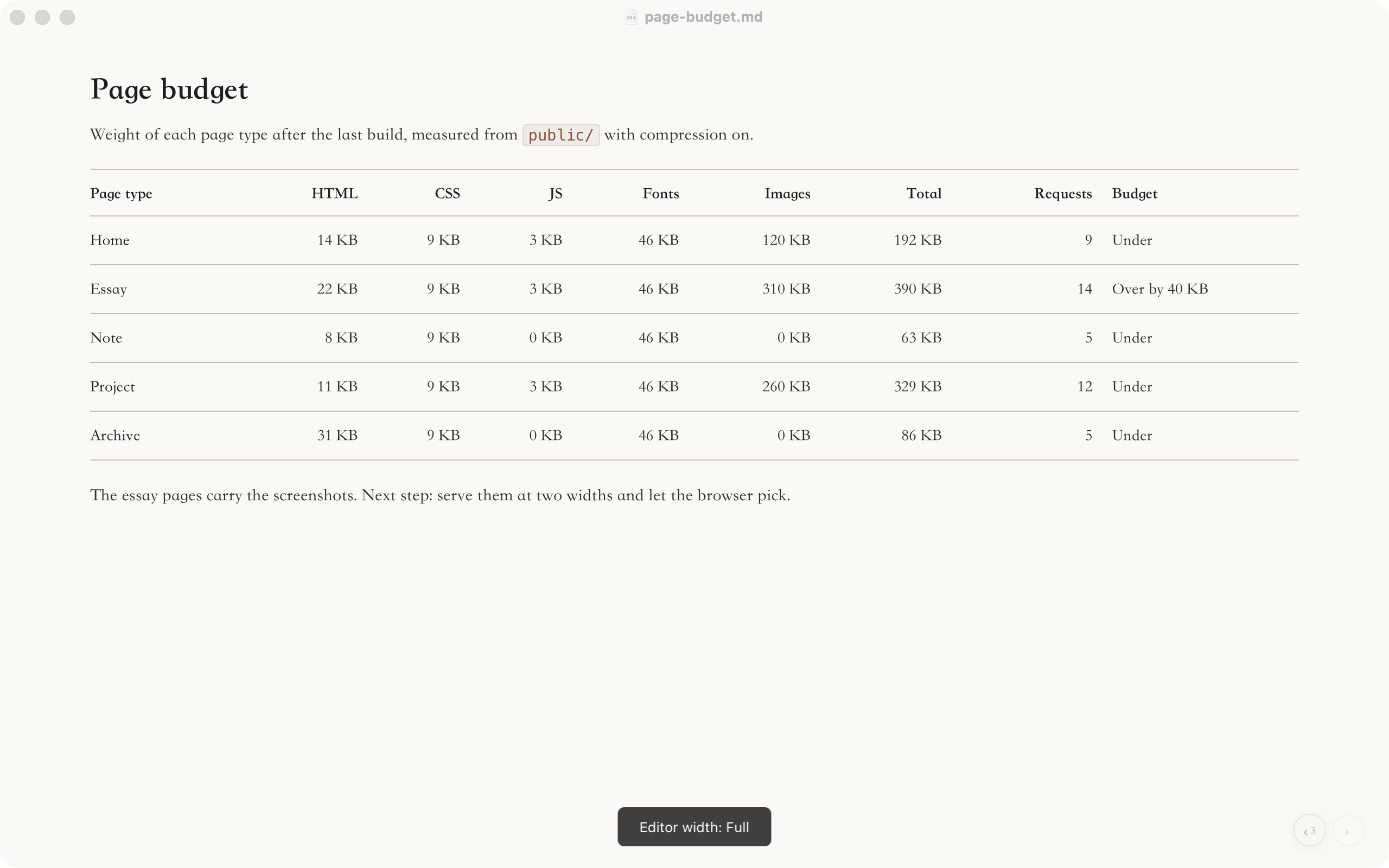
Wider gives the writing column three widths. Default keeps the column at up to 860 pixels, a comfortable line for long reading. Wide and full open it up for tables, code and logs. Cmd+] widens, Cmd+[ narrows, and a short toast names the mode. There is no button on the page. The widths come from the space Typora actually gives the editor, not from the window, so with the sidebar open or the window narrow, wide and full shrink to fit instead of adding a horizontal scroll bar.
Margin notes
A sidenote is plain inline HTML: <span class="sidenote">...</span>. Typora shows the class only as text, so CSS alone cannot find these spans inside the editor. The Sidenote plugin finds them, numbers them, and moves them into a layer beside the text when the window is wide enough.
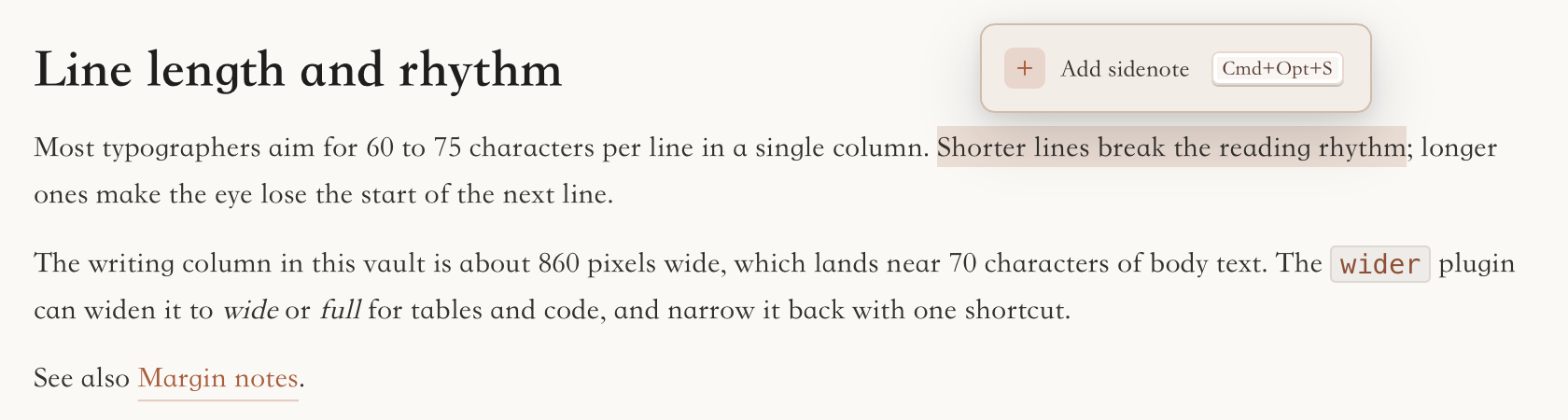
In a narrow window they stay inline. A note inside a table is drawn in the outer margin, so the table keeps its horizontal scroll. When the caret enters a paragraph, its notes return to the text so you can edit them. Cmd+Opt+S wraps the selection. The theme page shows the same notes in a wide and a narrow window.
Links between notes
Note Assistant draws [[target|title]] as a link anywhere in the body. It shows the title and opens the target on click. It never changes a character of the file: it splits the text into spans whose combined text is byte for byte the original, and hides the brackets and path with CSS.
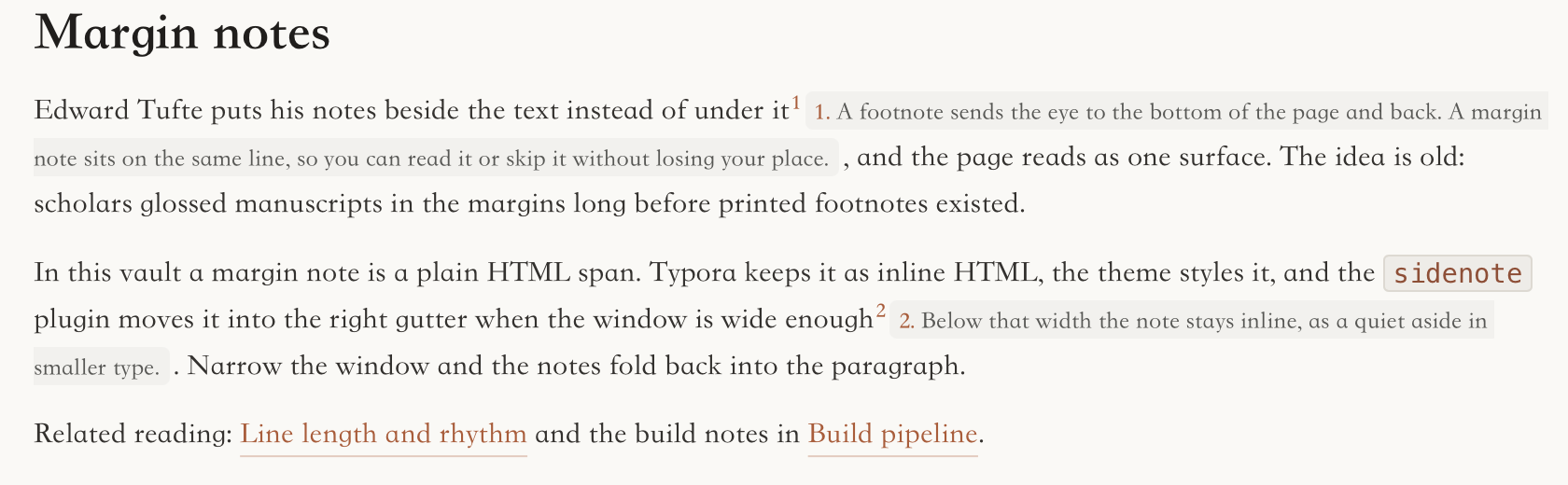
[[path|title]] text.The block holding the caret goes back to raw Markdown, the way Typora treats its own inline syntax. A link whose target is missing from the index is drawn dashed.
The source of that last line, as it sits on disk:
Related reading: [[reading/line-length|Line length and rhythm]] and the build notes in [[projects/static-site/build-pipeline|Build pipeline]].Cmd+; opens a palette of related notes for the open file, and Alt+Enter inserts a link to the chosen one at the caret. Both read .note-assistant/graph.json at the root of the vault. The script that builds that file is not part of this repository.
Code files
Open a .py or .ts file in Typora and it is parsed as Markdown: # comment becomes a heading and backticks disappear. Code Viewer opens text and code files read-only instead, with line numbers, highlighting and a language picker.
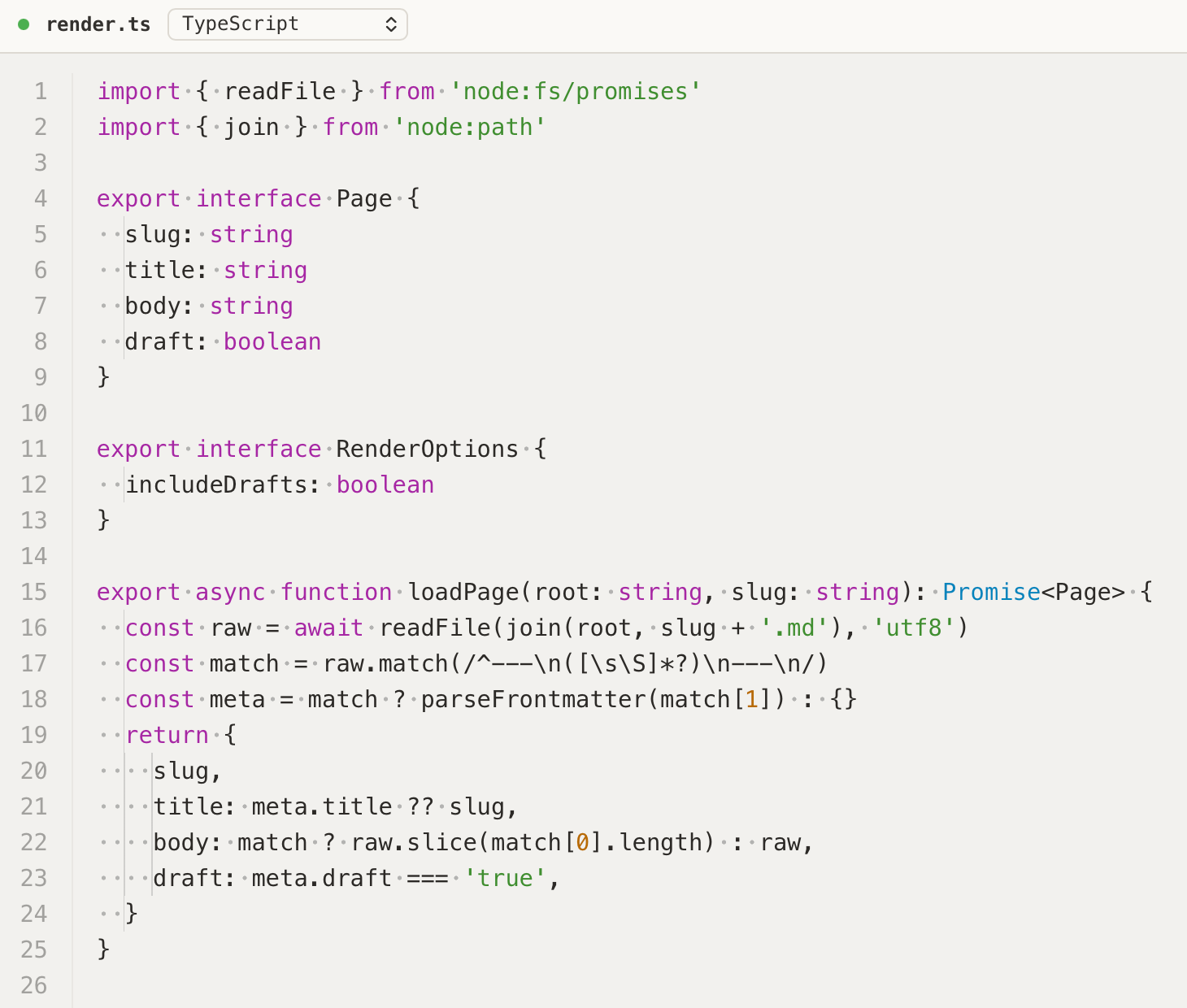
render.ts in Code Viewer, with whitespace markers and indent guides switched on.It never touches Typora’s document model, and it blocks saving for any file that is not Markdown, so the original cannot be rewritten by autosave or by quitting. An early version did put a fenced copy into the editor, and Typora wrote that copy back to disk on quit. The current design follows from that.
Finding files
Quick Open opens with Cmd+. and has three views over one search core: files, folders and content. With an empty box it lists recent files, ranked by how recently and how often you opened them. The index covers every text file it can open safely, not only Markdown. A small query language works in every view:
| You type | You get |
|---|---|
pipe | Files whose names match, best match first |
type:content scope:ops/ redis | A ripgrep search for redis in the Markdown files under ops/ |
/ then a path | Walk the open folder by path; Tab completes to the common prefix |
// or ~/ | Walk from the file system root or the home folder |
The labels in Quick Open’s panel are in Chinese for now, so this page has no screenshot of it.
The rest
Tree Guides draws the file tree’s guide lines as one path per folder and lights the branch that holds the open file. While it runs, the theme’s own CSS connectors step aside. Trail keeps the last three notes in each direction and shows two quiet arrows in the corner.
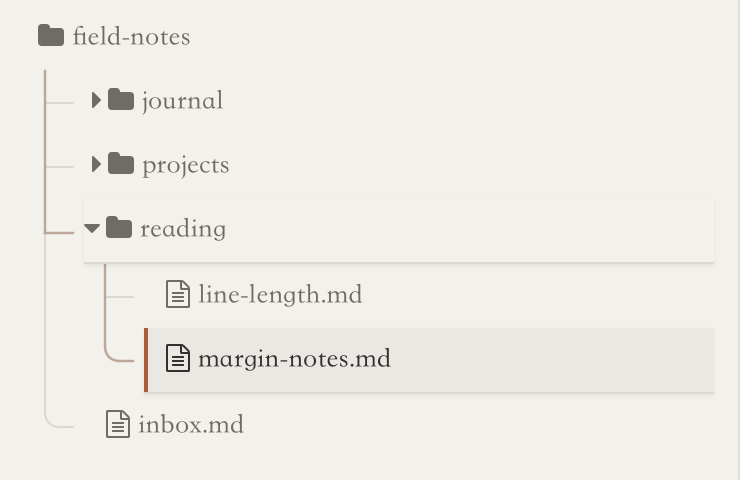
Markdown Padding puts a space between Chinese and Latin characters. Theme Pack keeps a theme from a GitHub repository in Typora’s themes folder, fetching only the files its theme-pack.json lists. It adds choices to the Themes menu and never switches the theme you use.
Remote control
remote-control starts a small Node process, the sidecar, that listens on 127.0.0.1:5619. Every Typora window connects to it as a session, and so does every client. A client must authenticate with a random token stored in the plugin’s settings.json. Calls to typora.* are forwarded to the window in focus; when that window closes, the sidecar falls back to the window used most recently before it. The sidecar watches Typora’s process and exits within five seconds of Typora dying, so a crash does not leave the port held.
The public typora-plugin-remote-skill packages a Node client and a CLI as an agent skill for Claude Code, Codex and other clients that read skills. This is the CLI against the demo vault used for the screenshots:
$ node scripts/typora-remote-cli.mjs ping
"pong"
$ node scripts/typora-remote-cli.mjs context | jq 'del(.commands)'
{
  "filePath": "/private/tmp/tpl-demo/field-notes/journal/2026-10-21.md",
  "fileName": "2026-10-21.md",
  "mountFolder": "/private/tmp/tpl-demo/field-notes",
  "watchedFolder": null,
  "sourceMode": false,
  "hasUnsavedChanges": false
}
$ node scripts/typora-remote-cli.mjs document | jq -r .markdown
<<<TPL_DOC_START id="848210745e7f" trust="untrusted">>>
# Tuesday 21 October

The render step now skips drafts. Next: the deploy checklist in [[projects/static-site/deploy-checklist|Deploy checklist]].

<<<TPL_DOC_END id="848210745e7f">>>
The markers around the document are there for agents. Each read gets a fresh random id and is labelled untrusted, so an agent can treat a note that says “ignore your instructions” as quoted data rather than as part of its conversation.
An agent with this connection can read the open note and the folder it sits in, replace the document or insert text at the caret, switch between source and rendered mode, open a file or folder, list and switch plugins, and run any Typora or plugin command. system.listMethods returns the whole surface as data, with each method’s tier and whether it is reachable now, so a client does not have to guess. The 25 methods sit in five tiers:
| Tier, and what it needs | Methods |
|---|---|
| open: nothing | session.authenticate |
| auth: a valid token | system.ping, system.getInfo, system.listMethods, system.shutdown, session.claimTypora |
| typora: a token and a connected Typora window | 14 typora.* methods: context, document, selection, insert, source mode, open file or folder, commands, plugins |
exec: a token and allowExec | exec.run, exec.start, exec.kill, exec.list |
eval: a token, a connected window and allowEval | typora.eval |
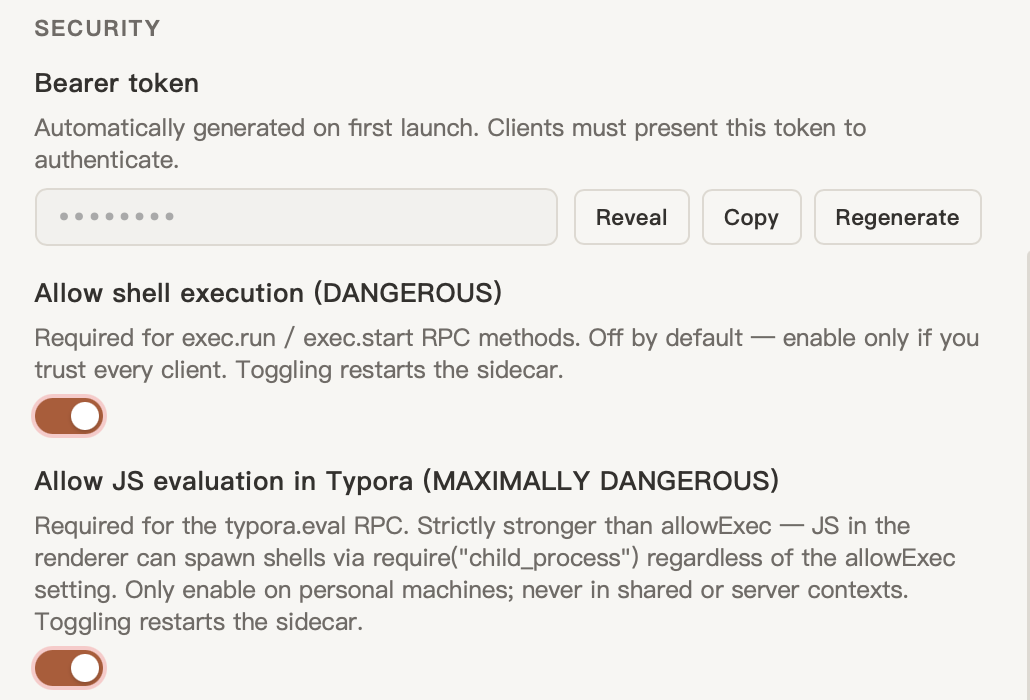
Shell and eval stay off
Running shell commands and evaluating JavaScript in Typora are separate switches, and both are off by default. The settings say plainly which is worse: JavaScript in the renderer can start a shell whatever the shell switch says. On macOS typora.eval runs as indirect eval in the page.
A synchronous infinite loop cannot be interrupted there, so its timeout applies only to async code. Forwarded typora.* calls time out after 30 seconds, so a window that hangs returns an error instead of a request that never ends.
Session archive
The repository also ships a command-line tool that turns a Codex or Claude Code session into a Markdown note for Typora. It keeps the visible turns, tool calls and results, and leaves out hidden reasoning and instructions. It replaces the home folder with ~, redacts common API keys, tokens and private keys, turns raw HTML into text, and writes the note with 0600 permissions through a temporary file. A long session can be split into an index and parts of a size you choose:
$ npm run build
$ node dist/tools/session-archive/index.mjs codex <session-id> --output-dir ~/Notes/Agents --max-file-size 4MiB
$ node dist/tools/session-archive/index.mjs claude <session-id> --mode answers -o session.md
How it is built and tested
The repository is a pnpm workspace. esbuild builds the loader as an IIFE, the core, each plugin, and the sidecar. Plugins import the core through a shim that the build script generates from the core’s real export table. Before that, a plugin could compile against a name the core no longer exported and get undefined at run time inside Typora.
The tests run on Node’s own test runner with happy-dom for the DOM. They cover the parts that break quietly: Quick Open’s scoring, query parser, path mode and recent-file ranking; the remote-control gates, timeouts and boundary markers; the sidecar’s watch on its parent process; sidenote geometry and lifecycle; Wider’s layout; and how the Plugin Center saves settings. On 22 October 2026:
$ npm test
# tests 382
# suites 0
# pass 382
# fail 0
Before v0.1.3 the release ran 261 tests, the type check, a production build and a manual check of Quick Open, Wider and Sidenote in Typora on macOS.
Install
- Build it. You need Node 22 or later and pnpm. Run
git clone https://github.com/lr00rl/typora-plugin-lite.git, thenpnpm installandpnpm buildinside the folder. - Run the installer. On macOS,
./packages/installer/install.sh, or-p /path/to/Typora.appif Typora is not in/Applications; macOS may ask for your password while it re-signs the app. On Linux,sudo ./packages/installer/install.sh. On Windows, an administrator PowerShell runspackages\installer\bin\install-windows.ps1. - Restart Typora. The developer console (Option+Cmd+I on macOS, Shift+F12 elsewhere) should print
[tpl:loader] done. Cmd+` opens the Plugin Center. - Update or remove it. To update, pull, build and run the installer again. To remove it, copy
window.html.tpl-backupback overwindow.htmlin Typora’s resources folder, or reinstall Typora.
Limits
The project is still under active development, and the README says so: the architecture and the plugin API can change without notice. There is no prebuilt download; you build from source.
The installer edits Typora’s own files. On macOS it re-signs Typora.app with an ad hoc signature, which replaces Typora’s own. A Typora update restores the original window.html, so after each update you run the installer again.
Some panels are only in Chinese for now: Quick Open, the Note Assistant palette, Trail’s tooltips and Code Viewer’s read-only badge. The Plugin Center, settings and the plugins’ editor behaviour are in English. Note Assistant’s palette needs a graph.json that this repository does not build.
The remote-control token is the only thing between a local process and your editor. Anyone who holds it can pose as a Typora window and take over routing, or call system.shutdown. It sits in a settings file in your user’s application data, so on a shared machine, whoever can read that file can drive Typora. Regenerate in the Plugin Center makes a new token, restarts the sidecar and drops every session.
The theme half of this work is the Claude-like theme, which Theme Pack installs by default; each works without the other. Working on both is what led to Noto, an editor where these choices are made from the start.