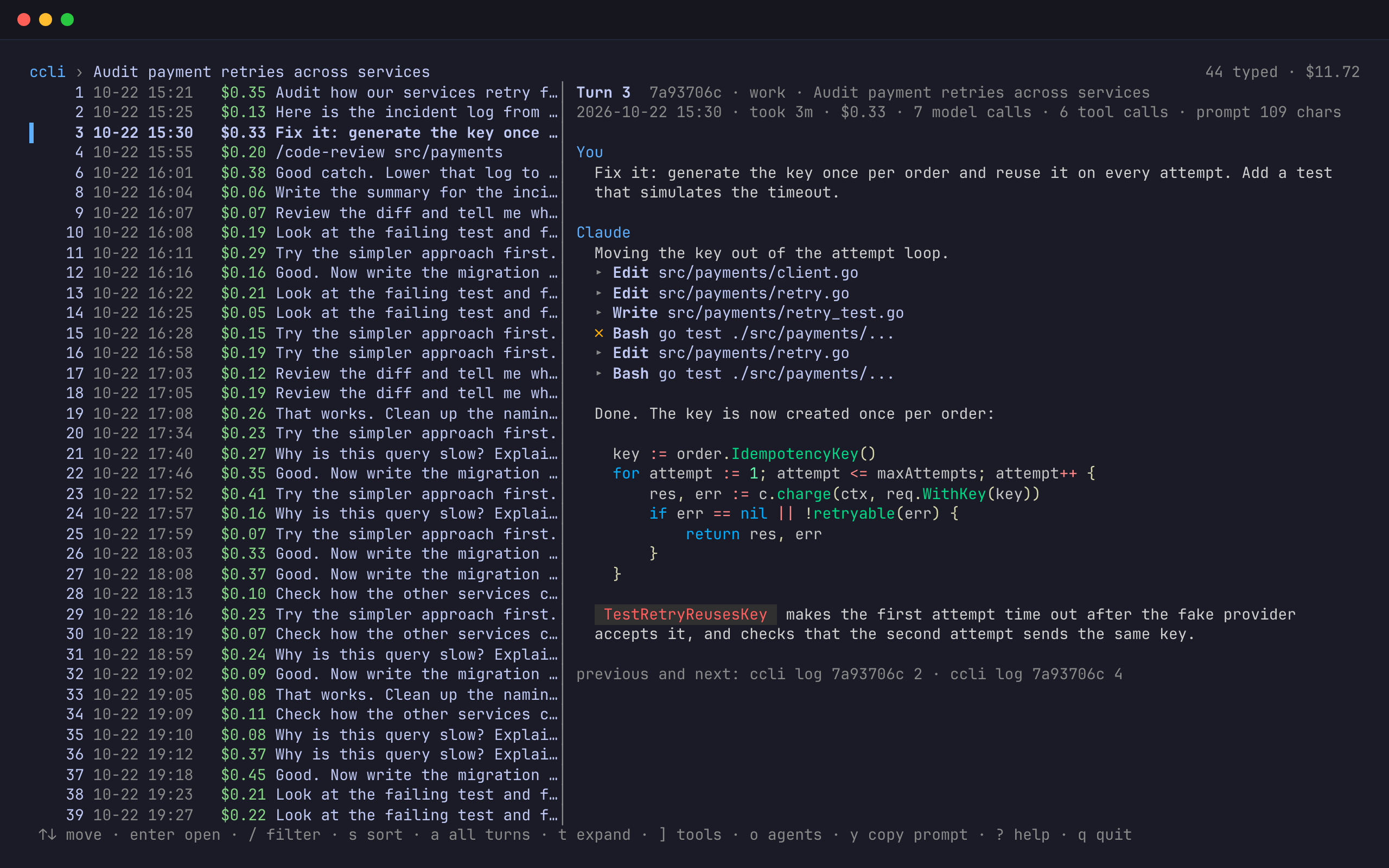
Coding agents keep careful records and show you almost none of them. Claude Code, Codex, Pi and Cursor each write a transcript of every session to disk, with every prompt, every tool call and the tokens of every model call. Their own interfaces answer the question in front of you right now. They do not tell you what yesterday’s session cost, which of its prompts spent most of it, how much of this week’s limit is left on each login, or how to carry a session from your personal account to your work account without counting its usage twice.
ccli reads those transcripts and answers those questions from the terminal. It is for people who run several agents, often under more than one login. It never reads the Keychain, never writes an agent’s settings and never calls a model; every command takes --json.
- Runs on
- macOS and Linux
- Needs
- Go 1.26 or later to install
- Reads
- Claude Code, Codex, Pi, the Cursor CLI and the Cursor IDE
- Latest release
- v0.1.0, 2026-10-21
- License
- AGPL-3.0
- Install
go install github.com/lr00rl/ccli@latest
An account, to ccli, is a config directory. ~/.claude is default and ~/.claude-work is work: the directory you pick with CLAUDE_CONFIG_DIR. A Codex home is an account too, and so are Pi’s agent directory and the two Cursor homes. If you keep a personal and a work login side by side, ccli sees both and keeps their usage apart. The first command indexes every transcript, which takes about 10 seconds for 4 GB on an M-series Mac; later commands read only what was added and return in well under a second.
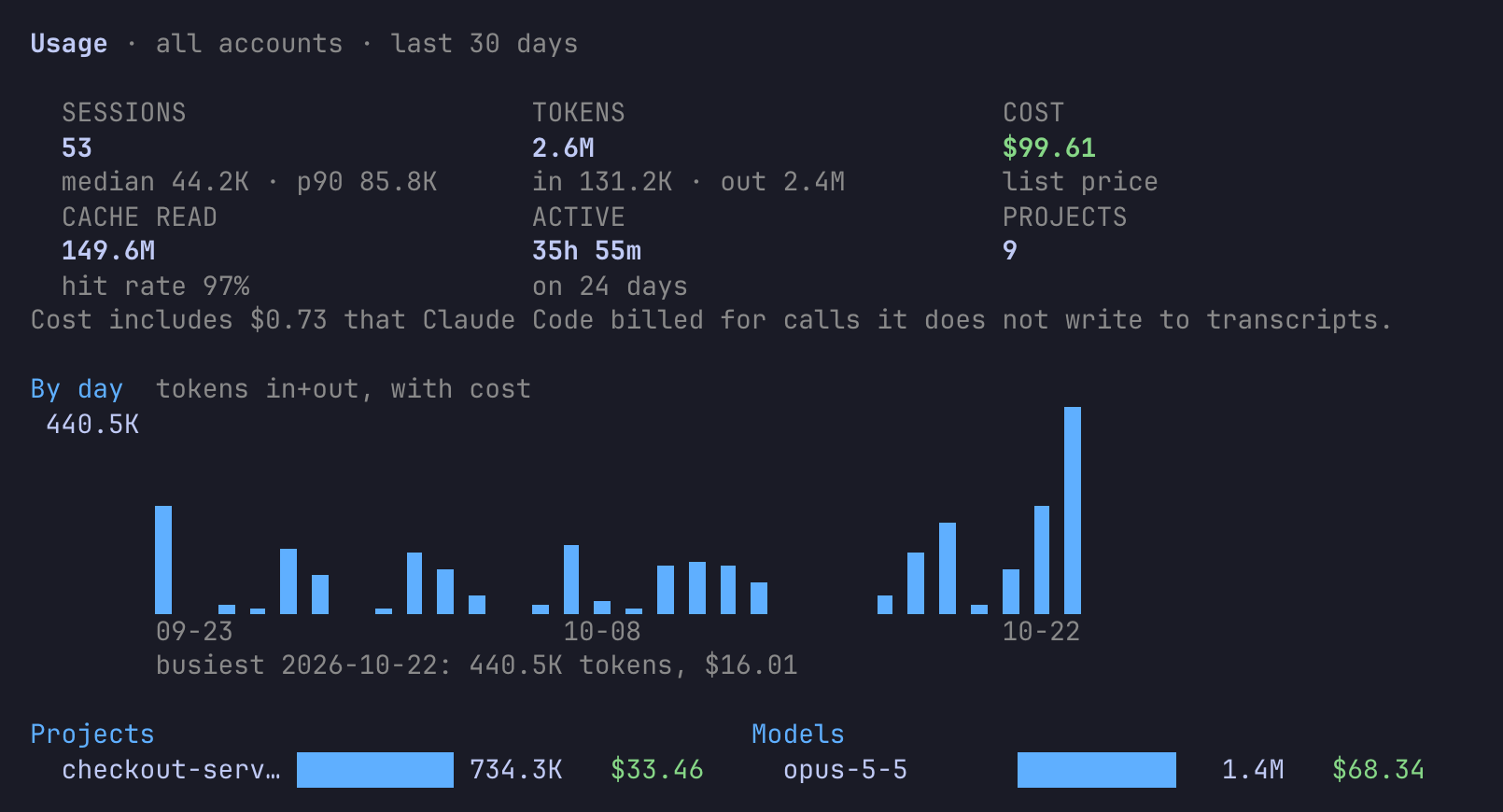
ccli stats starts with the totals and a daily chart; below it come projects, models, accounts, the hours you work, session shapes and skills.Where the money went, turn by turn
A session is a list of turns: a prompt and everything up to the next one. ccli log prints one line per turn, with when it ran, how long it took, what it cost, how many tools it called and how many agents it started; --sort cost puts the costliest first.
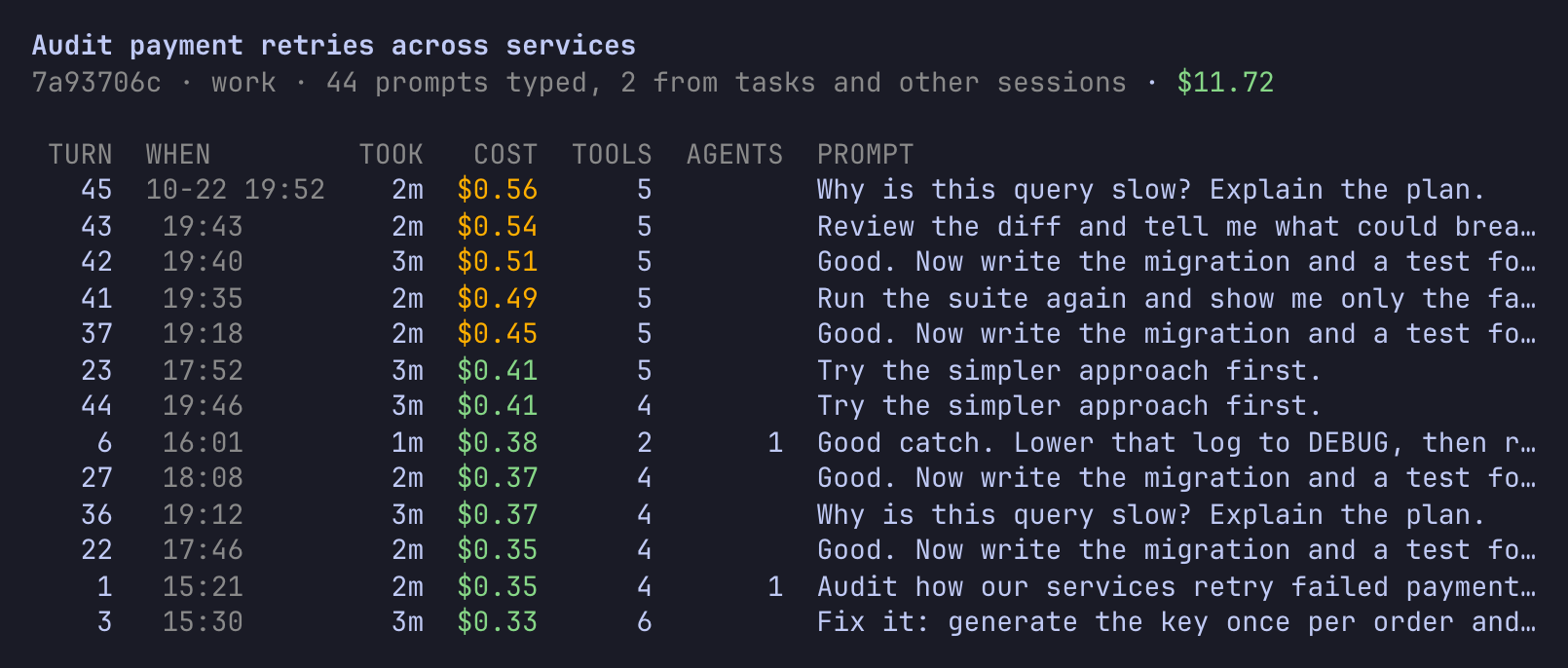
ccli log 7a93706c --sort cost. The costliest tenth of your turns is marked in amber.A turn’s cost includes the subagents and workflow runs it started, so a two-word “go on” that launched a large workflow shows up as the expensive prompt it was. ccli prompts --sort cost does the same across every session, which is the quickest way to find the prompts worth rewriting. Turns that background tasks, other sessions or the system started are counted apart and hidden unless you add --all.
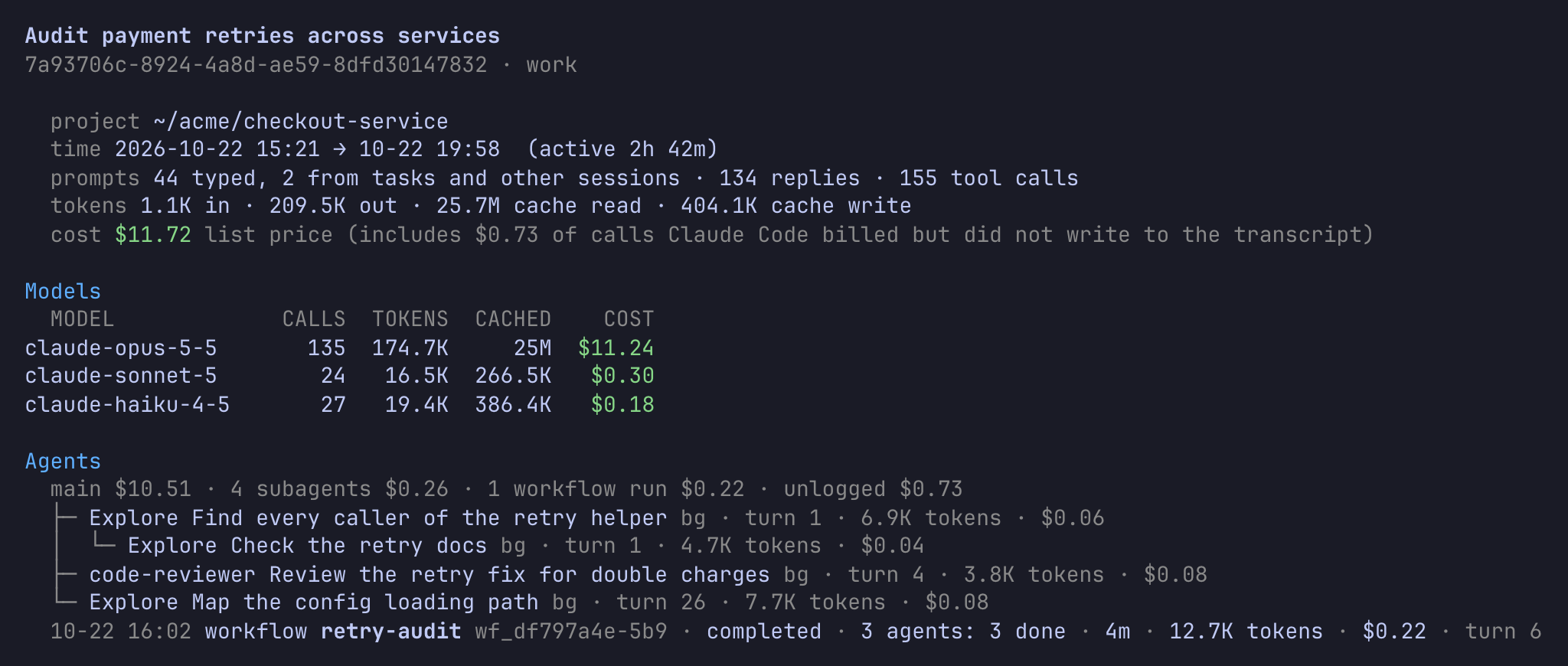
ccli show explains one session: its models, a line that splits the cost between the main conversation, subagents, workflow runs and calls Claude Code billed but never wrote to the transcript, then the tree of agents with the turn that started each.
Browsing it
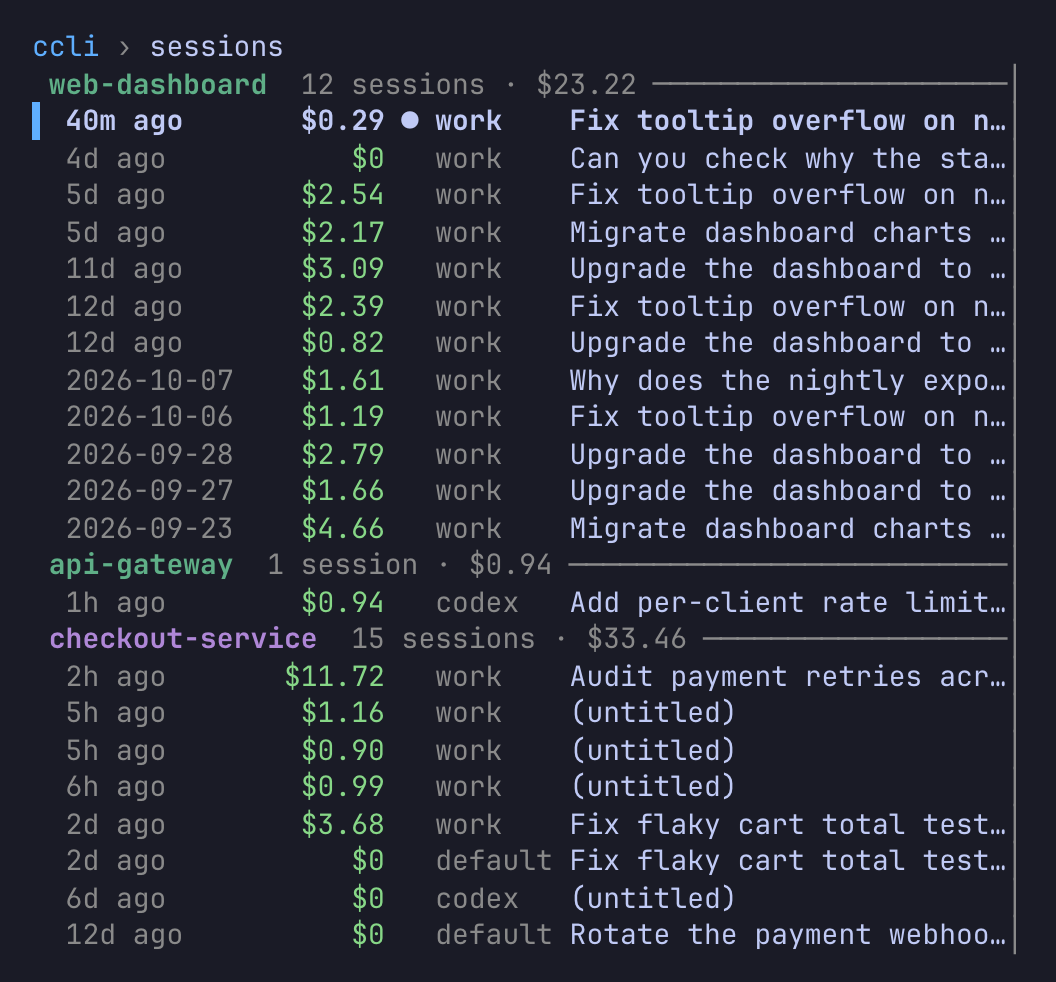
ccli view is the same data in an interactive browser: sessions grouped by project, then a session’s turns, then the agents a turn started, then an agent’s own transcript. The preview follows the selection.
Sessions by project
Each project gets a title in its own colour with its session count and cost. / filters by what the prompts say, s sorts by cost, m marks sessions and x hides the marked ones after asking. # tags a session in a line at the bottom, and ? lists every key.
A turn shows your prompt, the replies rendered as markdown and one line per tool call. t expands the calls with their input and output, ] opens one call on its own, and T and c add the model’s thinking and the text the tool added by itself. y copies the prompt to the clipboard.
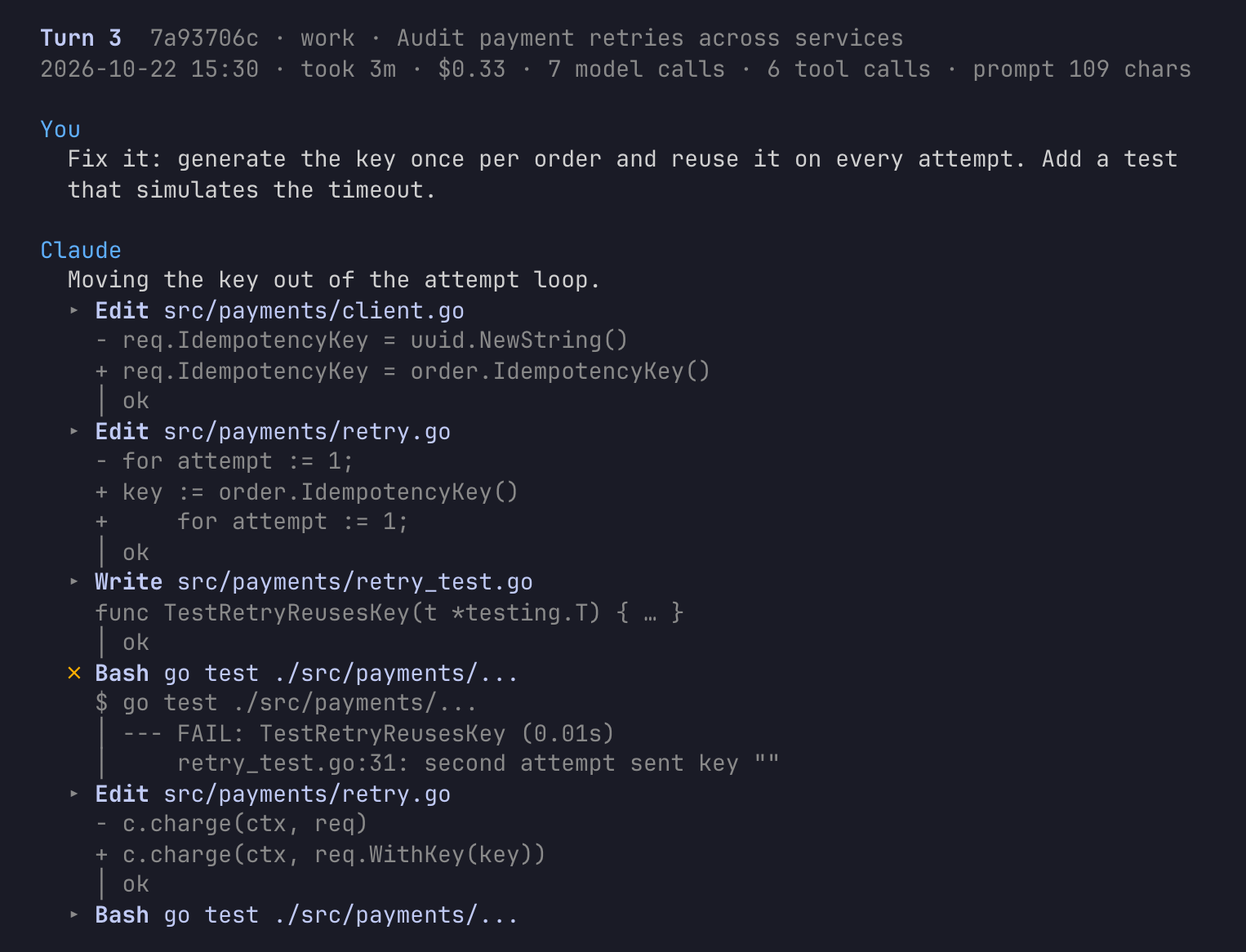
t pressed: the calls in the order they happened, including the test that failed before the fix.Limits without credentials
ccli quota shows the 5-hour and weekly windows of every Claude Code and Codex account, when each resets, and what this machine used inside each window, counted from the window’s real start. A Cursor account shows its billing cycle instead.
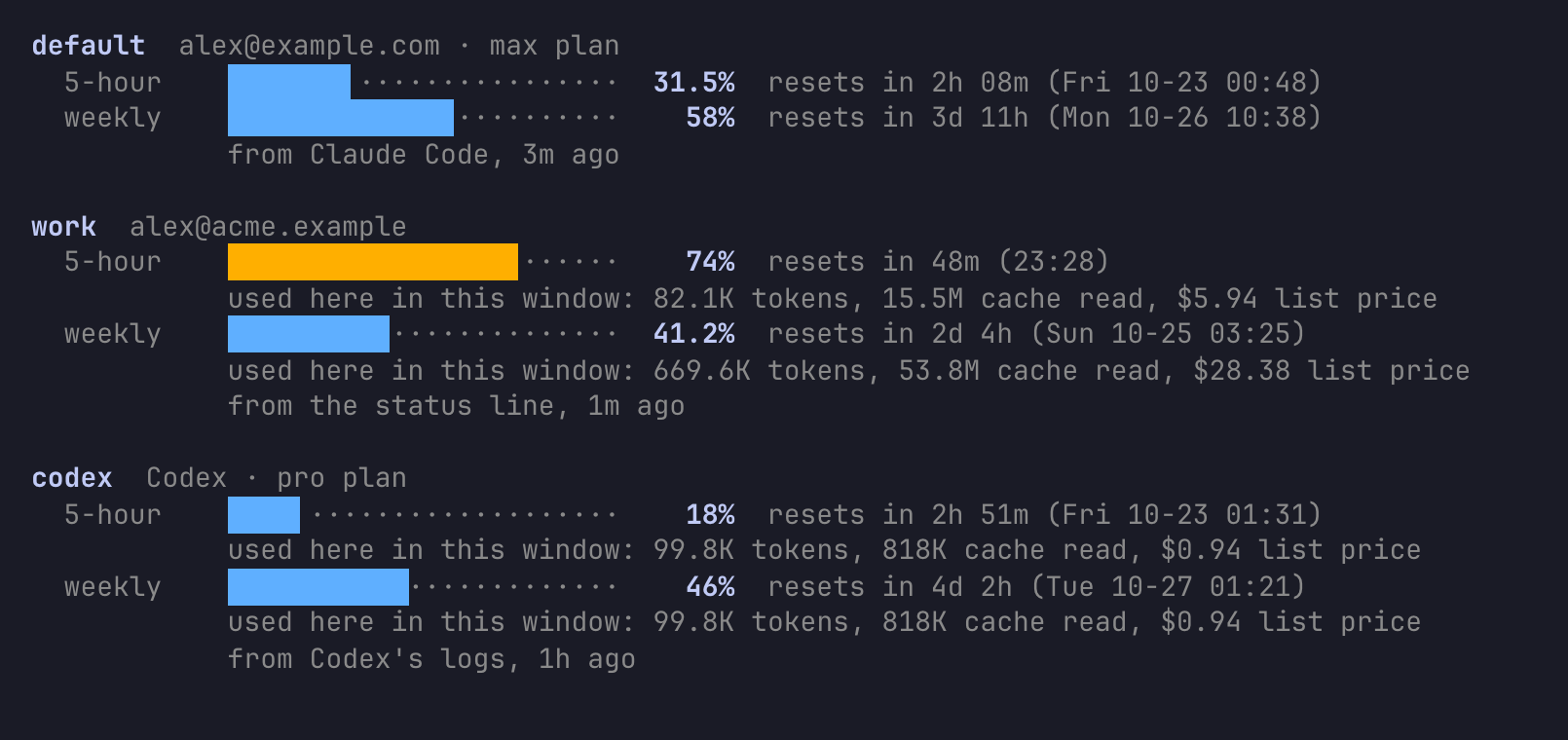
--offline shows the last saved figures and says where each came from and how old it is.The figures come from the tools themselves. ccli starts Claude Code once per account as claude -p with stream-json input, in an empty folder of its own, with no prompt, none of your hooks or MCP servers, and no transcript, and sends it the same control request that backs /usage. Codex is asked through its app server. Each tool answers with its own login, so ccli reads no credentials, and the check takes a few seconds. Cursor is the one exception: its transcripts carry no usage, so ccli sends the login the Cursor IDE stored to Cursor, and nowhere else.
Passive sources keep --offline current between checks. Codex writes its limits to its own logs, which the index reads. Claude Code passes rate_limits to your status line command after each reply, and a wrapper records them for the account, adding about 20 ms:
"statusLine": { "type": "command", "command": "ccli statusline -- <your current command>" }If you use CCometixLine, ccli reads the percentages from the cache it keeps per account, and never the token it used.
Moving a session between accounts
Claude Code ties a session to the account that started it. ccli copies it to another account, and back, without mixing up whose usage is whose.
- See where each session lives.
ccli diff default worklists the sessions that are only in one account, in both, ahead in one, or diverged. - Plan the copy.
ccli copy <id> --from work --to defaultprints a plan and changes nothing. A copy only fast-forwards: the target must be an exact prefix of the source, and no Claude Code process may be running the session in any account. - Apply it. Add
--apply.movecopies, checks every file byte for byte, and archives the source under~/.local/share/ccli/archive/instead of deleting it. - Keep working from either side.
ccli resume <id> -a workbrings that account’s copy up to date from the newer one and starts Claude Code there;-a defaulttakes you back.
$ ccli copy 746cbfa4 --from work --to default
ID        DIRECTION       PROJECT     TITLE                              BYTES  ACTION
746cbfa4  work → default  mobile-app  Why does the nightly export take…    98K  fast-forward
Dry run, nothing was copied: 1 of 1 sessions would copy. Add --apply to do it.
ccli records every byte range it copies, and a response that arrived with a copy never counts toward the account it was copied into, so usage stays with the account that made it however often a session travels. If both copies went on separately, they have diverged, and ccli will not merge them: Claude Code loads one line of messages, so a merge could keep only one. ccli fork <id> -a default --apply continues the other copy under a new id instead, and --turn 12 ends the fork at turn 12, like /rewind into a new session that the original keeps going beside.
Sessions you are done with can be hidden from lists (ccli hide), tagged (ccli tag), or, when they hold nothing at all, set aside:
$ ccli clean
Nothing was changed. Run with --apply to do this.
LAST     ACCOUNT  ID        DO       PROJECT
12d ago  default  f33442ad  archive  ~/code/photo-sync
9d ago   work     5a9c2637  archive  ~/acme/checkout-service
6d ago   codex    9e947588  hide     ~/acme/checkout-service
Nothing is deleted. An empty Claude Code transcript moves into ccli’s archive, sessions of the other tools are hidden because ccli does not write their homes, and ccli clean --undo <stamp> puts a run back.
How it counts
Costs are list prices from an embedded table, plus $0.01 per server-side web search; ~/.config/ccli/prices.json overrides any model. A subscription is not billed per token, so the figure says what the same work would cost on the API. A model the table does not know is counted in tokens and left out of cost, never counted as zero.
Claude Code writes one API response as several transcript lines; ccli counts each response once. It also adds the calls Claude Code made but never logged: each process keeps running totals in its own state, and where those show tokens the transcript lacks, ccli adds them at base list price, which is the “unlogged” part in ccli show. Codex logs a running total per process; ccli counts each call once, across compactions, resumes and forks. Pi writes a dollar cost on each call, and ccli keeps it. Cursor’s lines carry no model, tokens or time, so those come from Cursor’s usage events.
The index is a SQLite file in ~/.local/share/ccli/ccli.db. Only copy, move, fork, resume -a and clean write into an account, and only the files of the session involved. DESIGN.md has the full contract, the transcript fields used and the store schema.
Limits
- Copying, moving, forking and
resume -awork between Claude Code accounts only. To hand a Codex, Pi or Cursor session to another tool,ccli exportwrites it as markdown or jsonl for a person or an agent to read; no tool can resume it. - The live limit check depends on a control request that Claude Code marks experimental in its SDK protocol. When a check fails, ccli says why and falls back to the saved figures. Pi is not asked at all.
- Claude Code deletes transcripts that have not changed for
cleanupPeriodDays, 30 by default. ccli keeps its totals and your prompts, but opening an old turn, resuming or copying needs the transcript, so raise the setting if you want them longer. - Cursor needs the IDE’s stored login for its figures, and the CLI and IDE are separate accounts: the same conversation is not merged across them.
Every picture here comes from a made-up home with two Claude Code accounts and a Codex home, generated by scripts/demo in the repository, so you can try ccli without touching your own data:
$ go run github.com/lr00rl/ccli/scripts/demo@latest -home /tmp/ccli-demo
$ HOME=/tmp/ccli-demo XDG_DATA_HOME=/tmp/ccli-demo/.local/share ccli stats- Source: github.com/lr00rl/ccli (AGPL-3.0)