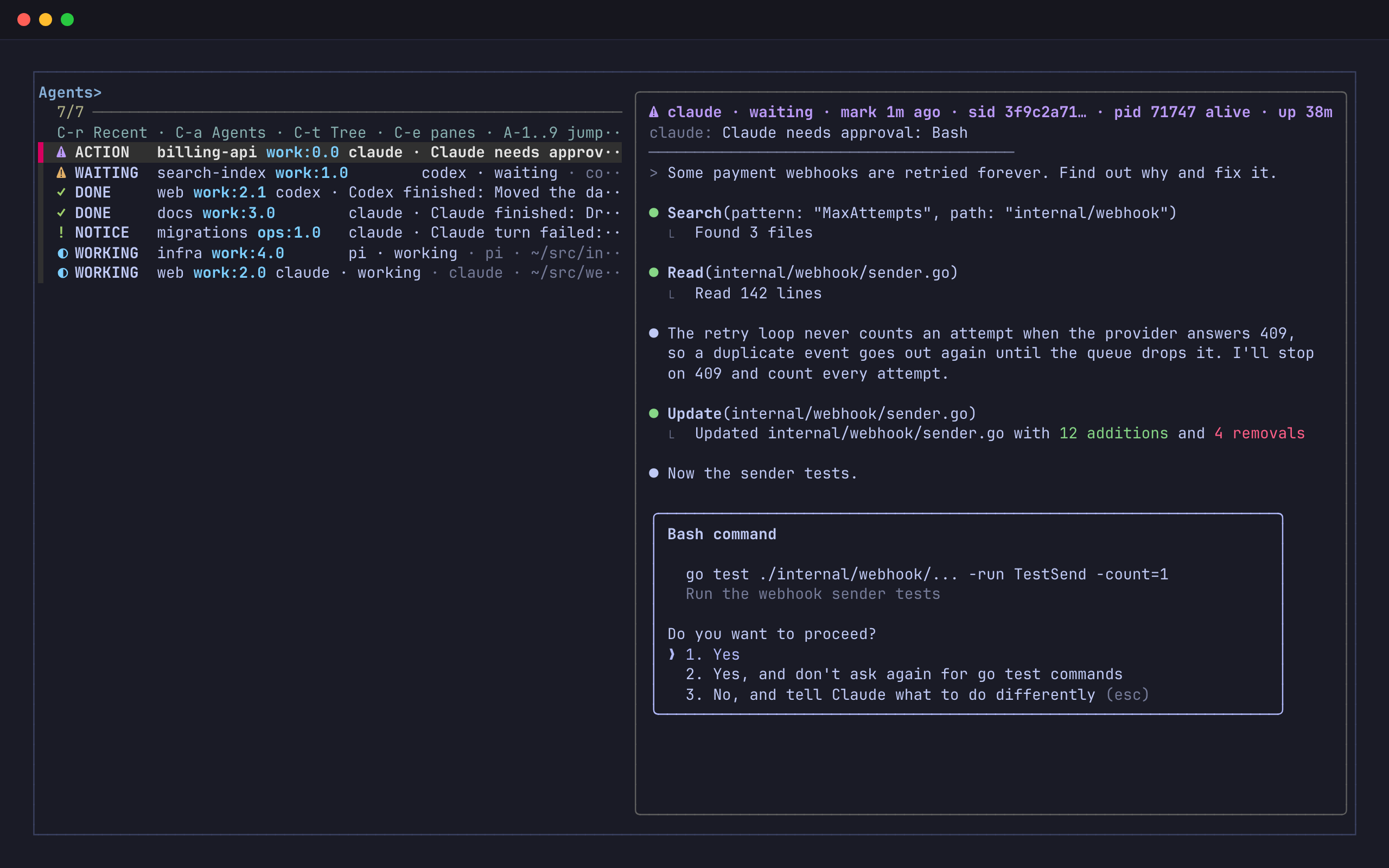
Put five coding agents in tmux and the hard part is no longer the code. One of them stopped twenty minutes ago to ask whether it may run the tests. Another finished its turn and is waiting for you to read the result. A third is still working. Each agent shows its state only to the person looking at its pane, and you are looking at a different one.
tmux is the one layer that sees every pane of every agent, whatever the vendor. tmux-radar works there. It is a switcher on prefix C-w with three views (Recent, Agents and Tree) and a live preview, plus a notifier that marks the exact pane that needs you, puts a chip on the status line and floats a short toast in the corner. It observes and points. It never answers a prompt, sends keys to an agent or closes a pane.
- Runs on
- macOS and Linux, inside tmux 3.2 or later (native Windows has no tmux; WSL works)
- Needs
- fzf 0.59 or later, and jq for the agent hooks
- Written in
- shell that is safe on macOS Bash 3.2, plus one JavaScript and one TypeScript bridge; nothing to build
- Latest tag
- v0.1.4, 2026-08-11; TPM installs the main branch
- License
- MIT
- Install
set -g @plugin 'lr00rl/tmux-radar', then prefix I
The Agents board
Ctrl-a in the picker opens the Agents board, the one place that answers “which agent needs me, and what is the rest of the fleet doing”. Every row is a live pane, and every row starts with a state word, so the meaning never depends on colour alone.
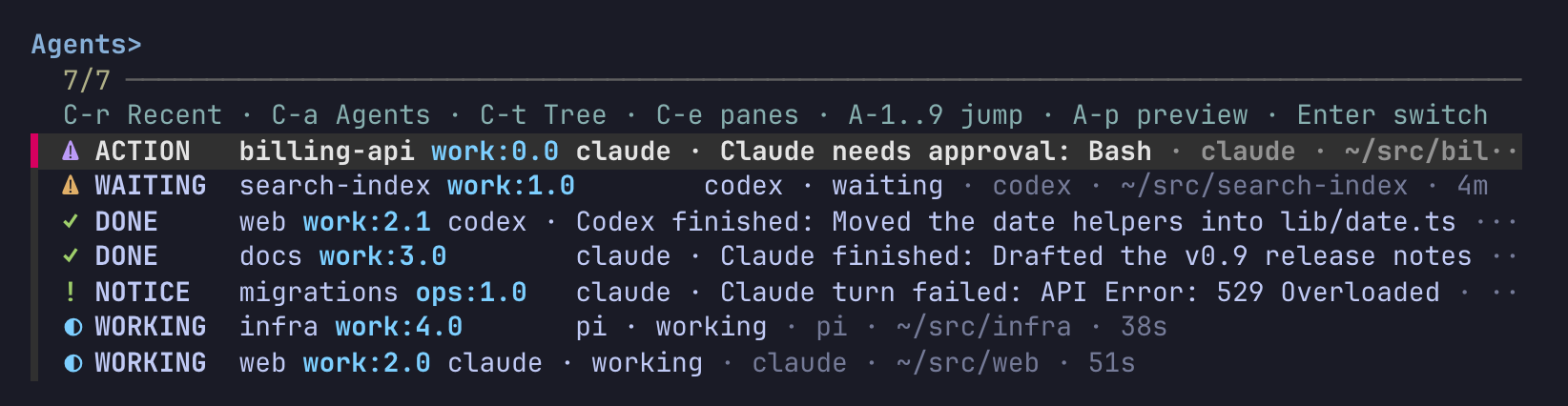
| State | Glyph | What it means | Where it comes from |
|---|---|---|---|
| ACTION | ⚠ | The agent asked for a permission or a question, unread | the agent’s hook |
| WAITING, BLOCKED | ⚠ | The session waits on you; BLOCKED is the scanner reading it from the pane title | the registry, or the screen |
| DONE | ✓ | A turn finished and you have not looked at it yet | the agent’s hook |
| NOTICE | ! | Anything else worth a look, such as a turn that died on an API error | the agent’s hook |
| WORKING | ◐ | The agent is busy; nothing to do | the registry, or the screen |
Rows sort by that order and newest first within a level. An idle agent counts as a free shell and earns no row, and a Claude Code session that runs outside tmux never becomes a fake destination: it reaches you through the status line instead. A finished Claude turn is labelled with the first line of its answer, so Claude finished: Drafted the v0.9 release notes tells you whether the turn is worth opening before you open it.
The preview on the right shows the selected pane anchored to the bottom, so the current prompt is always in view. For a marked pane it adds a header line above the capture: the agent, its state, how old the mark is, the session id, whether the process is alive, and the working directory. Enter switches to that exact pane. The picker keeps a stable pane id (%7) behind every row and checks it again before switching, so a pane that closed while the picker was open fails out loud instead of taking you somewhere else.
Three views on one key
The picker opens on Recent. Its first row is the window you are in, and the cursor starts on the second, so prefix C-w then Enter takes you back to where you just were.
Recent
Every live window, the ones you used most recently first and every other window after them, so a stale history cannot hide work. The window name you gave the window is the first thing you type against: a match in the window name ranks ahead of the same text found only in a pane title, a command or a path.
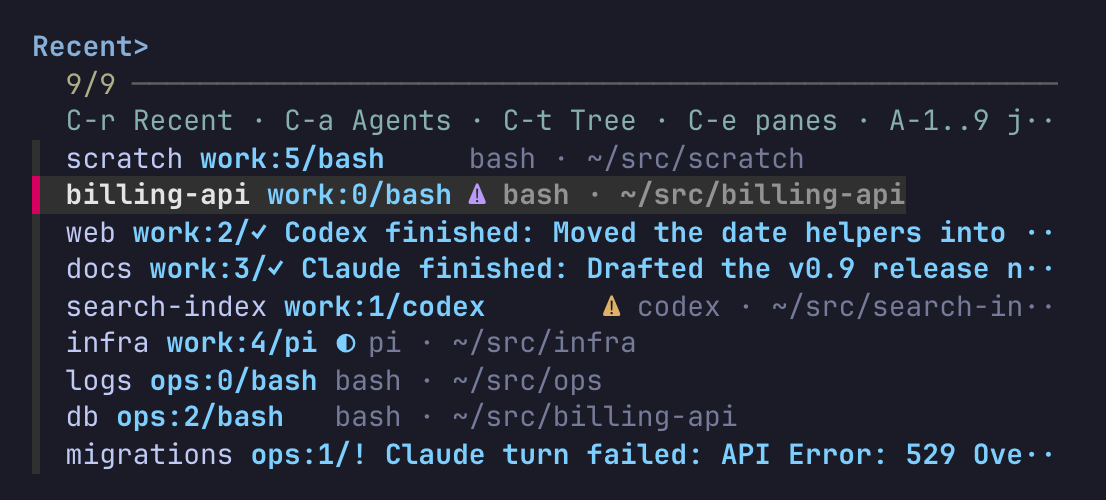
⚠ needs you, ✓ finished, ◐ working.Tree
Sessions, then windows on one continuous rail with aligned two-column indexes. Ctrl-e drills into pane leaves in Tree and in Recent.
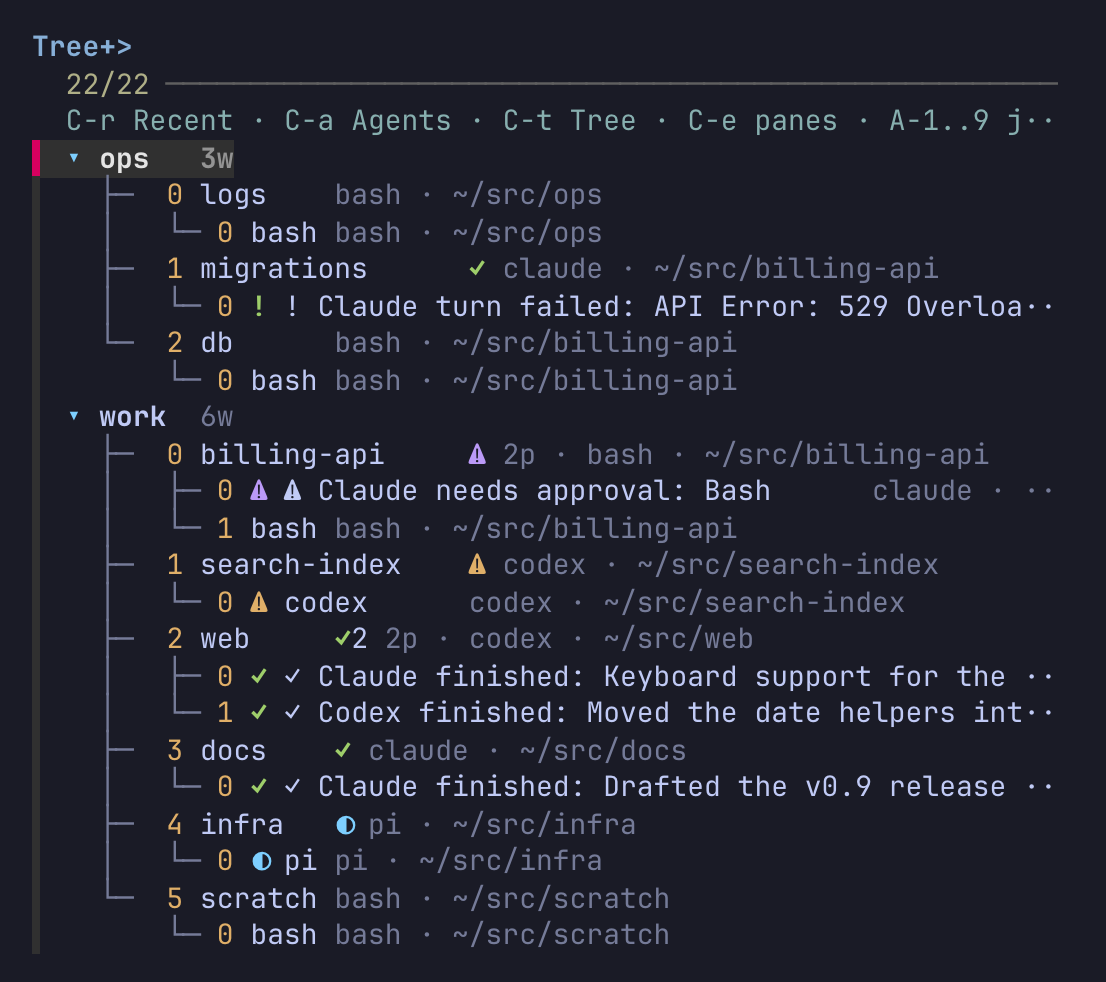
2p.Every row in every view targets one real pane, and the keys are the same in all three:
| Key | Does |
|---|---|
| type | search the window name first, then location, title, command, path and state |
| Ctrl-r Ctrl-a Ctrl-t | Recent, Agents, Tree |
| Ctrl-e | show or hide pane leaves in Recent and Tree |
| Alt-1 to Alt-9 | jump straight to that visible row; a number with no row rings the bell and stays |
| Alt-p, Shift-↑ Shift-↓, PgUp PgDn | toggle and scroll the preview |
| Enter, Esc | switch, or leave without switching |
Outside the picker, prefix Tab toggles between your two most recently used panes across windows and sessions. tmux’s own last-pane only works inside one window.
When an agent needs you somewhere else
The board is where you look. The notifier is what makes you look. When an agent asks for approval or finishes a turn in a pane you are not on, three things happen at once: the pane’s title flips to a status label (⚠ Claude needs approval: Bash), the window gets a chip on the status line, and every client that is not on that pane gets a toast in its top-right corner.
A toast that does not take the keyboard
It is not a tmux popup. While a popup is open tmux stops redrawing every pane and sends every key to the popup, which is wrong for a notice that arrives while you type. radar-float.sh writes the box straight to the client’s terminal instead: it saves the cursor, paints the box, and restores the cursor.
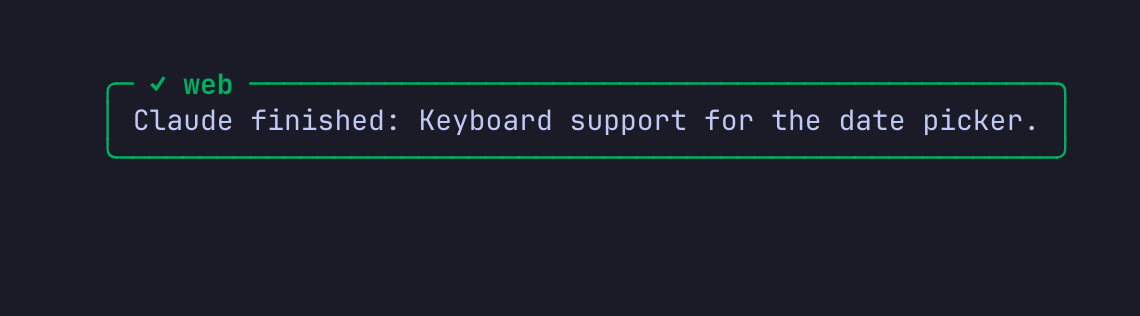
Panes keep drawing, keys go where they always went, and it works the same over SSH. It leaves after @radar-toast-duration, or as soon as you go to that pane; with mouse on, a click on it takes you there.
The chip stays after the toast is gone. Each window with unread marks gets one, approvals first, with a count when a window holds several, and radar also lights the window’s number in the level’s colour. On a client narrower than 120 columns the chips fold into one count per level, and the window names share out the remaining width so none hides behind tmux’s >.

None of this resizes anything: the number of status lines never changes at runtime, because raising a line resizes every pane. An approval’s chip stays until you handle it; a finished turn’s chip fades after ten minutes (@radar-bar-ttl), while the mark stays in the picker and the pane title until you visit.
For a notice outside tmux, @radar-notify-command runs a command once per new mark, with the mark in RADAR_LEVEL, RADAR_LABEL, RADAR_WHERE and a few more variables. The repository ships a desktop notifier for macOS and Linux:
set -g @radar-notify-command '~/.tmux/plugins/tmux-radar/examples/notify-desktop.sh'Claude Code and Codex also print a stamp at the end of every turn, such as UTC 2026-10-16T11:39:03Z → 11:39:50Z turn took 47s, followed by the session id and transcript file.
Hooks for the agents you have
The plugin sets up the tmux side on its own. To let agents mark their own pane, run the installer once. It wires every agent it finds, skips the rest, keeps your existing hooks and symlinked config files, writes a backup only when a file changes, and rolls back every file it touched if a later write fails. This is its output in a home with Claude Code, Codex and pi:
$ ~/.tmux/plugins/tmux-radar/scripts/install-hooks.sh install
Installing tmux-radar AI-status hooks:
  Codex notify already integrated (legacy fallback)
  Codex native PermissionRequest -> ~/.tmux/plugins/tmux-radar/scripts/needinput-notify.sh codex-hook
  Codex native Stop -> ~/.tmux/plugins/tmux-radar/scripts/needinput-notify.sh codex-hook
  Codex native UserPromptSubmit -> ~/.tmux/plugins/tmux-radar/scripts/needinput-notify.sh codex-hook
  Kimi not found (no ~/.kimi-code, no 'kimi' on PATH) - skipped
  Claude SessionStart -> ~/.tmux/plugins/tmux-radar/scripts/needinput-notify.sh claude-register
  Claude Notification -> ~/.tmux/plugins/tmux-radar/scripts/needinput-notify.sh claude-mark
  Claude Stop -> ~/.tmux/plugins/tmux-radar/scripts/needinput-notify.sh claude-stop
  Claude StopFailure -> ~/.tmux/plugins/tmux-radar/scripts/needinput-notify.sh claude-fail
  Claude UserPromptSubmit -> ~/.tmux/plugins/tmux-radar/scripts/needinput-notify.sh claude-clear
  Claude PostToolUse -> ~/.tmux/plugins/tmux-radar/scripts/needinput-notify.sh claude-resolved
  Claude SessionEnd -> ~/.tmux/plugins/tmux-radar/scripts/needinput-notify.sh claude-end
  OpenCode not found (no ~/.config/opencode, no 'opencode' on PATH) - skipped
  pi extension -> ~/.pi/agent/extensions/tmux-radar.ts (run /reload inside live pi sessions)
  Cursor CLI not found - skipped
  Droid not found - skipped
  Gemini CLI not found - skipped
  Auggie not found - skipped
Done. Restart agent sessions (or reload their config) to pick up the hooks.
$ ~/.tmux/plugins/tmux-radar/scripts/install-hooks.sh status
Claude hooks installed: 7/7
Codex native PermissionRequest: installed (1)
Codex native Stop: installed (1)
Codex native UserPromptSubmit: installed (1)
Codex legacy notify fallback: installed
Kimi: not installed (skipped)
OpenCode: not installed (skipped)
pi extension: installed
Cursor: not installed (skipped)
Droid: not installed (skipped)
Gemini: not installed (skipped)
Auggie: not installed (skipped)
Where each agent's approvals and finished turns come from
| Agent | Where radar hooks in | Approvals | Finished turns |
|---|---|---|---|
| Claude Code | ~/.claude/settings.json | Notification | Stop, with the answer’s first line |
| Codex | ~/.codex/hooks.json and notify | PermissionRequest | Stop |
| Kimi Code | a marker block in its config.toml | PermissionRequest | Stop |
| OpenCode | ~/.config/opencode/plugins/ | permission and question events | idle |
| pi | ~/.pi/agent/extensions/ | ui_prompt_start, a dialog an extension opens mid-run | agent_settled |
| Grok Build | runs Claude’s hooks as they are | Notification | Stop, with the answer’s first line |
| Cursor CLI | ~/.cursor/hooks.json | its pane title, with status indicators on | stop |
| Factory Droid | ~/.factory/settings.json | Notification | Stop |
| Gemini CLI | ~/.gemini/settings.json | Notification | AfterAgent, with the answer’s first line |
| Auggie | ~/.augment/settings.json | none: a wait reads as a stalled pane | Stop |
| Amp | nothing: it has no shell hooks | none | the screen scanner |
Grok and Cursor were checked against live sessions, and Droid’s session start and end too. Gemini and Auggie follow their published schemas.
How it knows what a pane is doing
Two sources feed one model. Hooks push events the moment they happen; a scanner pulls what hooks cannot see.
flowchart LR
  H["agent hooks"] --> N["notifier"]
  S["scanner, every 10 s"] --> N
  N --> F[("marks, registry, verdicts")]
  F --> P["board, badges, preview"]
  F --> C["chips, window colours"]
  N --> T["toast, notify command"]
Hooks are read for what they say. The Claude adapter looks at the payload and its environment before it marks anything. A permission prompt or a question becomes ACTION. The reminder Claude sends after a minute of idling changes nothing, because Stop already said the turn ended. A turn that stops while a subagent is still running is paused, not finished. A turn that died on an API error becomes a NOTICE. A headless run that an agent started from a tool call (claude -p, codex exec, an Agent SDK script) inherits that agent’s $TMUX_PANE; the notifier walks the process tree up from the hook, sees the other agent above it, and reports nothing. A member of a Claude agent team reports to its lead, so its finished turns raise no mark either, while its approvals still do. All seven Claude hooks are synchronous, so events reach the notifier in the order they happened, and an approval answered in place is cleared by the next PostToolUse rather than left behind.
The scanner is the floor beneath the hooks. Hooks miss sessions started before installation, agents without an adapter, and approvals given in place. Every @radar-scan-interval seconds (10 by default, at least 5) the scanner finds panes that host a watched agent process and classifies each one. It matches the process’s argv0 against @radar-needinput-commands rather than tmux’s pane_current_command, because Claude Code’s foreground binary shows up as a bare version number such as 2.1.199. A pane whose title or screen checksum changed since the last sample is working; one that did not is stalled; one whose title asks for action (Codex’s Action Required, Cursor’s Waiting for confirmation) is blocked. An untracked agent pane is adopted into the registry, and an observed transition on an off-screen pane, into blocked or out of working, becomes exactly one mark. A pane owned by a session that reports through its own hooks is left to those hooks, so a resize or a banner on an idle agent never reads as a finished turn.
Marks heal themselves. A mark clears when you focus that exact pane, never its siblings, or when you reply to that session. A mark whose agent has exited is dropped, matched by both pid and argv so a reused pid cannot keep a dead session alive. A mark on a pane that is seen working in two scans counted from the mark’s own time is healed, while a freshly drawn permission prompt explains one screen change and never two in a row, so a real request never disappears under you.
State lives in plain files under ~/.local/state/tmux/, replaced atomically under one lock, and needinput-notify.sh doctor prints why a row is or is not on the board.
Configuration
Set options before the plugin loads. Most people need none of them; these are the ones worth knowing:
set -g @radar-key 'C-w'                      # the picker key, after the prefix
set -g @radar-default-view 'recent'          # or agents, tree
set -g @radar-preview 'right:55%'            # fzf preview position and size
set -g @radar-needinput-commands 'codex claude opencode kimi pi cursor-agent grok'
set -g @radar-bar 'auto'                     # chips inside status-right; pinned or off
set -g @radar-bar-ttl 'action=0 done=600 notice=600'
set -g @radar-toast 'float'                  # status for a status-line message, or off
set -g @radar-toast-levels 'action done'     # leave notices out of toasts

set -g @plugin 'lr00rl/tmux-radar'
All 29 options are in the README, and the guides cover agent hooks and custom adapters and toasts and notifications.
Limits
- Detection is only as precise as the agent allows. Amp has no hooks, so radar knows it only through the scanner. Cursor and Auggie report finished turns but no approvals, so a pane waiting on approval reads as stalled and is flagged as finished, unless Cursor’s status indicators are on.
- The toast can tear under a pane that scrolls fast. Under a pane printing about 30 lines a second, the box was whole in two samples out of three. Agent screens that redraw in place leave it steady.
- Clicking a chip needs tmux 3.4 or later; clicking a toast works on any version.
- The tags lag behind the code: v0.1.4 is from August, and the main branch that TPM installs has had 23 commits since.
- By design it never acts for you. It cannot approve a request or restart a stuck agent; it can only take you to the pane.
The pictures on this page come from a private tmux server with made-up projects. The agent screens are stand-ins, the live scanner was off so static panes would not read as idle, and the marks were written through the notifier’s own mark command; the board, the views, the toast and the status line are tmux-radar’s real output.
- Source: github.com/lr00rl/tmux-radar (MIT)