TLS Companion is for engineers who want to understand a TLS handshake by watching one happen. A sequence diagram and a few RFC sections leave out what you need when something breaks: which function wrote this byte, which secret protects this record, and which sentence of the RFC asks for it.
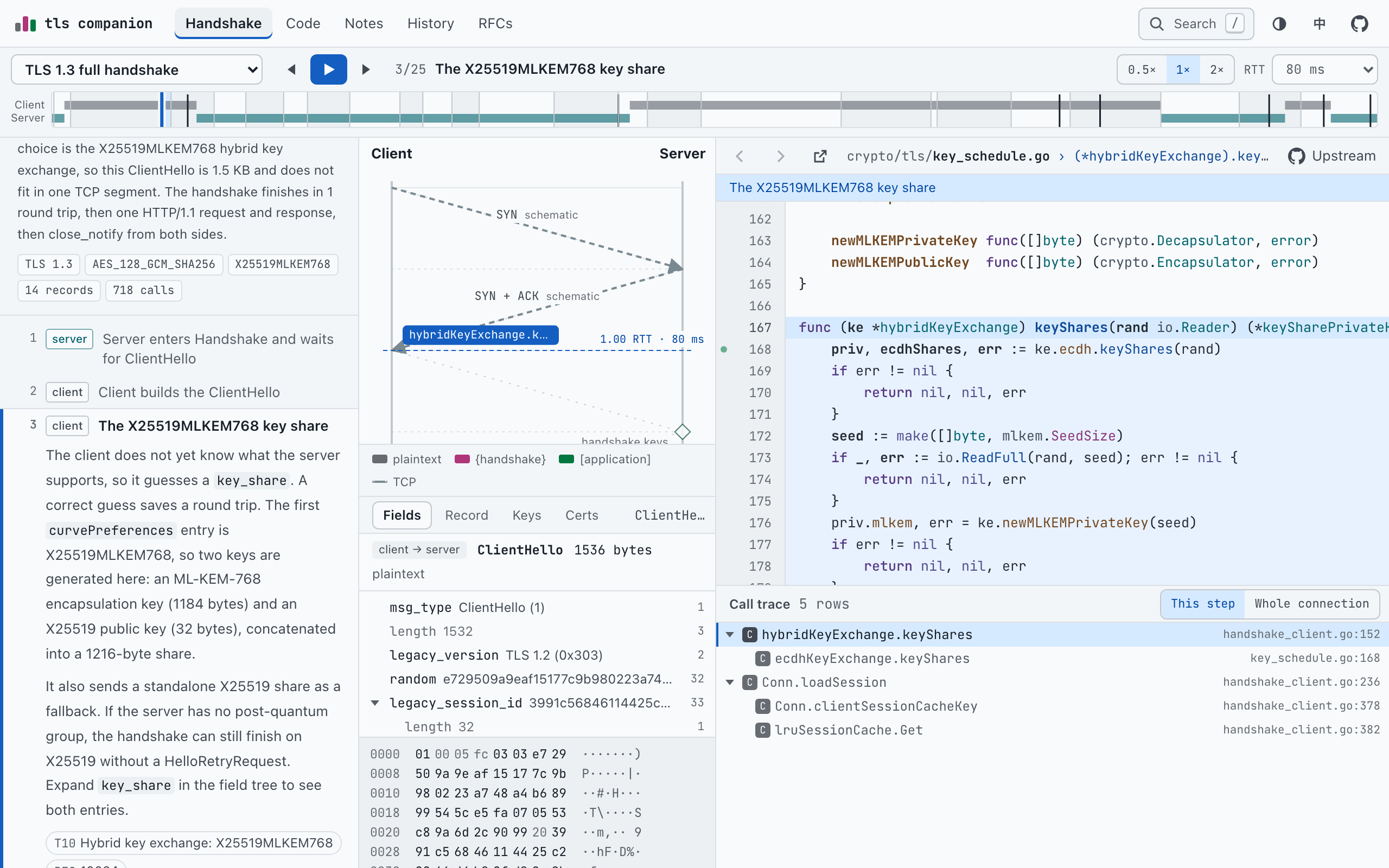
The workbench fills that gap with recordings. A capture program starts Go’s crypto/tls client and server in one process and records every byte on the wire, every secret the key schedule derives and every function both sides enter. You replay that recording one step at a time, and the sequence diagram, the packet inspector, the key schedule, the Go source and the call trace all point at the same moment.
- What it is
- a study workbench in the browser for TLS 1.3 and TLS 1.2
- Recordings
- five connections between Go 1.26.1’s own client and server, narrated in 63 steps
- Beside them
- the Go source with a call trace, 40 RFCs, 15 notes in English and Chinese, a history of 34 entries
- How you use it
- keyboard first, every view is a link, a phone layout, and a static reading edition that needs no JavaScript
- Built with
- three Go tools that index, instrument and capture; React, TypeScript and Vite for the site
- License
- MPL-2.0 for the code, CC BY-NC-SA 4.0 for the notes
Five connections, recorded for real
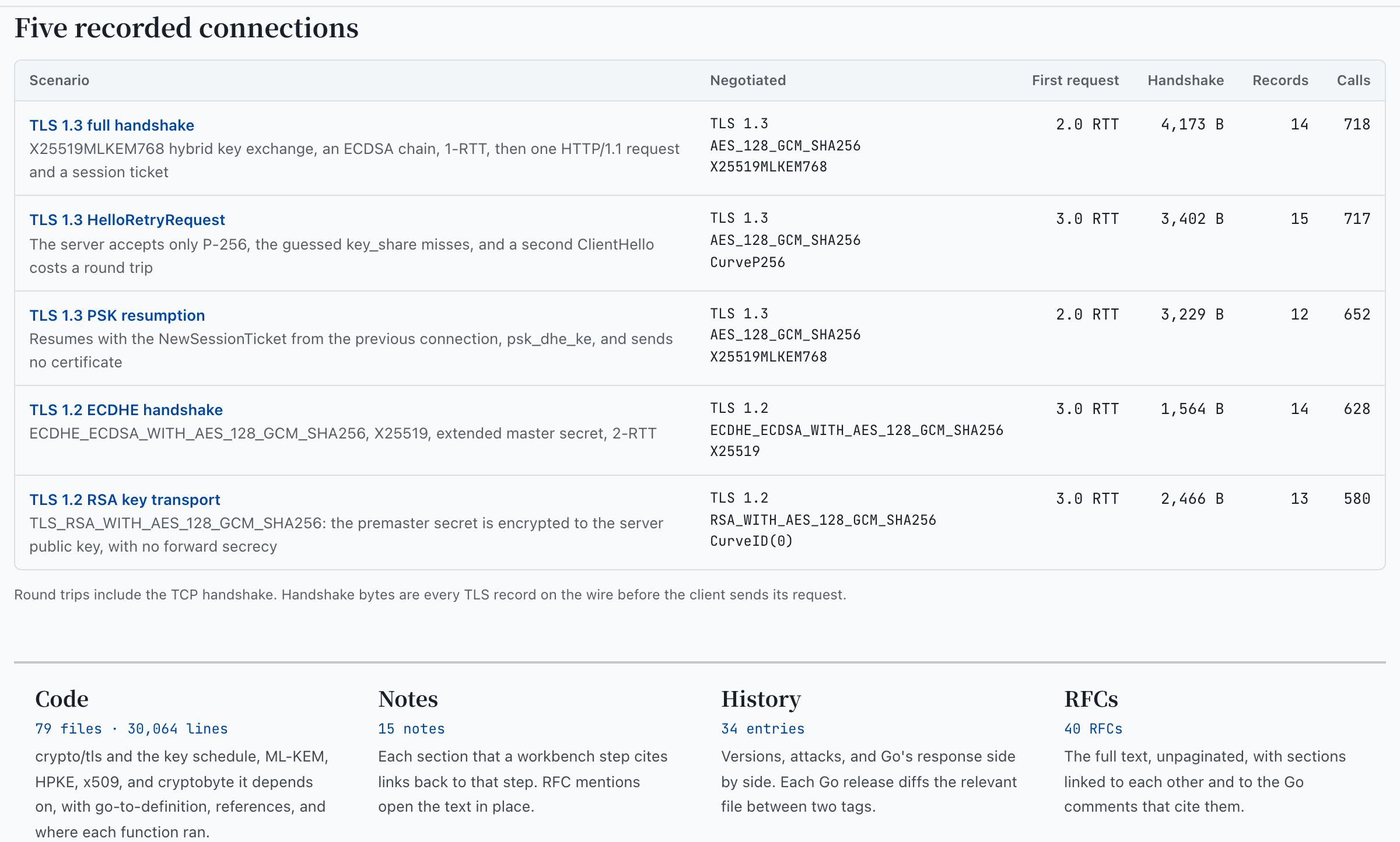
The TLS 1.3 full handshake uses the X25519MLKEM768 hybrid key exchange, an ECDSA certificate chain and one HTTP/1.1 request: 2 round trips before the request, counting TCP, and 4,173 bytes of handshake records. The HelloRetryRequest recording shows what a wrong guess costs: the server accepts only P-256, the client’s first key share misses, and a second ClientHello adds a round trip. The other three are a PSK resumption, which sends no certificate, and TLS 1.2 with ECDHE and with RSA key transport, which has no forward secrecy.
A walk through one handshake
Follow the TLS 1.3 recording from the first byte to the last. It has 25 steps, each narrating one slice of the event log.
- Open the recording. “Replay the TLS 1.3 handshake” on the home page opens step 1: the server goroutine calls
Handshake(), reachesreadClientHelloand blocks on a read. The rail on the left lists every step; Right arrow moves to the next one. - Stop at the key share, step 3. The client does not yet know what the server supports, so it guesses. Go’s first preference is X25519MLKEM768, so it generates an ML-KEM-768 encapsulation key of 1,184 bytes and an X25519 key of 32 bytes, joined into a 1,216-byte share, and adds a plain X25519 share as a fallback. The code panel opens
hybridKeyExchange.keyShares, the function that did it. - Watch it reach the wire, step 4. The ClientHello record is 1,536 bytes. With its 5-byte header that is more than the 1,460-byte segment common on Ethernet, so on a real network it needs two TCP segments, and the diagram draws that limit as a dashed line. A ClientHello with only an X25519 share is about 300 bytes.
- Follow the server, steps 5 to 15. It picks the suite and the group, encapsulates to get the hybrid secret, sends the ServerHello and a one-byte ChangeCipherSpec that only exists for old middleboxes, derives the handshake keys and sends its encrypted flight at once.
- Check the server, steps 16 to 20. The client decapsulates, gets the same handshake keys, verifies the certificate chain at step 18, verifies the signature over the transcript, and checks the server’s Finished.
- Finish, steps 21 to 25. The client sends its Finished, the HTTP request and response go out under the application keys, and both sides close with
close_notify.
Every panel points at the same moment
One selection drives the whole screen. Choosing a step moves the playhead to its first event, selects its message and opens its code. Choosing a field in the message opens the line that marshals it. Choosing a call in the trace moves the playhead. Dragging the timeline moves everything at once.
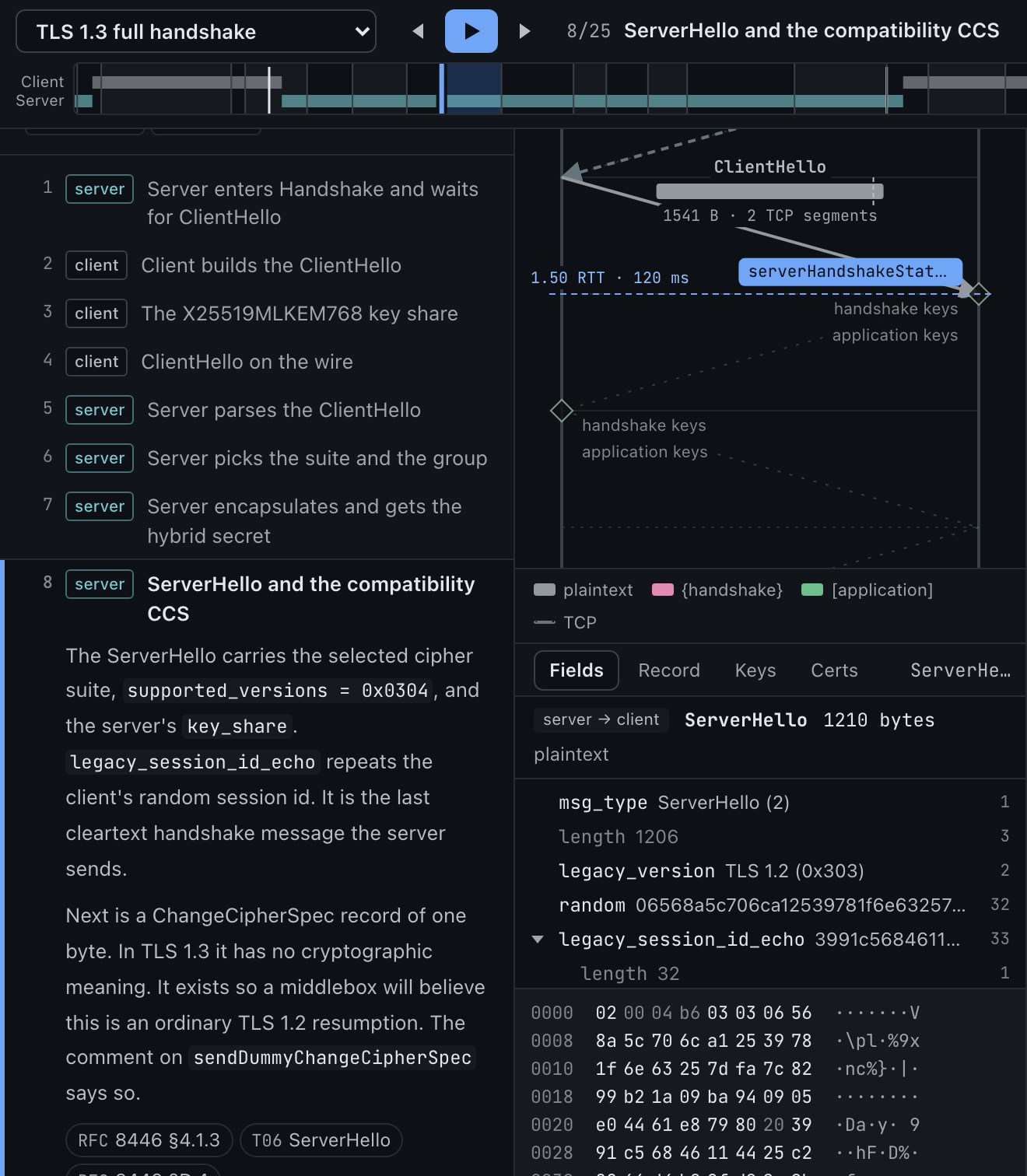
Records on the diagram are drawn to byte scale and coloured by the secret that protects them, and the labels use the RFC 8446 notation as well, {} for handshake keys and [] for application keys, so the colour never carries the meaning alone.
Fields, bytes and keys
Below the diagram, the inspector has five tabs. Fields is a tree of the selected message above its hex dump, and picking a field opens the Go line that marshals it. Record shows the record header and which key protects the record, and “Jump to the write” moves to the moment it was sent. Certs shows the chain, and Conn shows each side’s tls.Config, the ConnectionState() both ends reported, and the key log.
The key schedule, with the real values
The Keys tab draws the key schedule of RFC 8446 §7.1 as a tree and fills in the values crypto/tls actually derived, for the client and for the server. “both sides” means the two ends reached the same value. The Go button next to each secret moves the playhead to the moment it was derived.
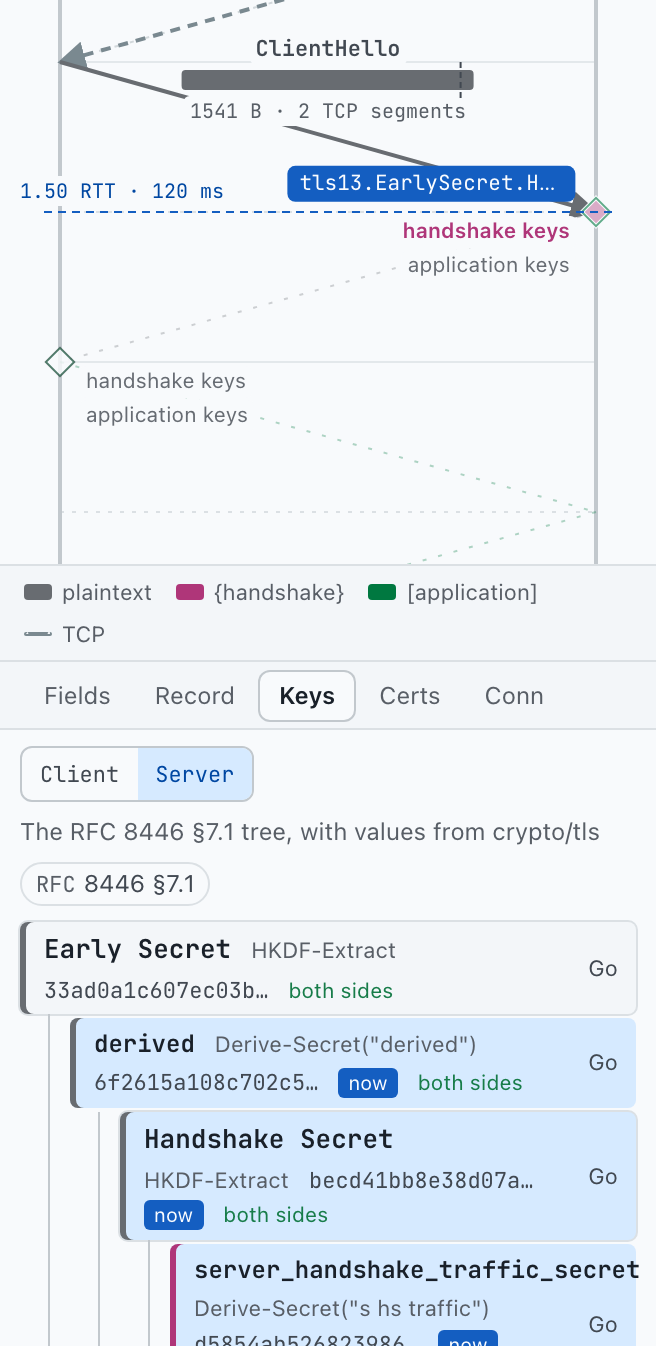
The key log lines in the Conn tab are the ones Config.KeyLogWriter writes. Load them into Wireshark and it decrypts a capture of the same connection; the site decrypted its own records with nothing else.
The certificate check, replayed
Step 18 is the moment the client decides whether to trust the server. The workbench replays Conn.verifyServerCertificate as it ran: the code panel stops on chains, err := certs[0].Verify(opts), the call trace below lists the step’s calls in 41 rows, and the Certs tab shows what was checked.
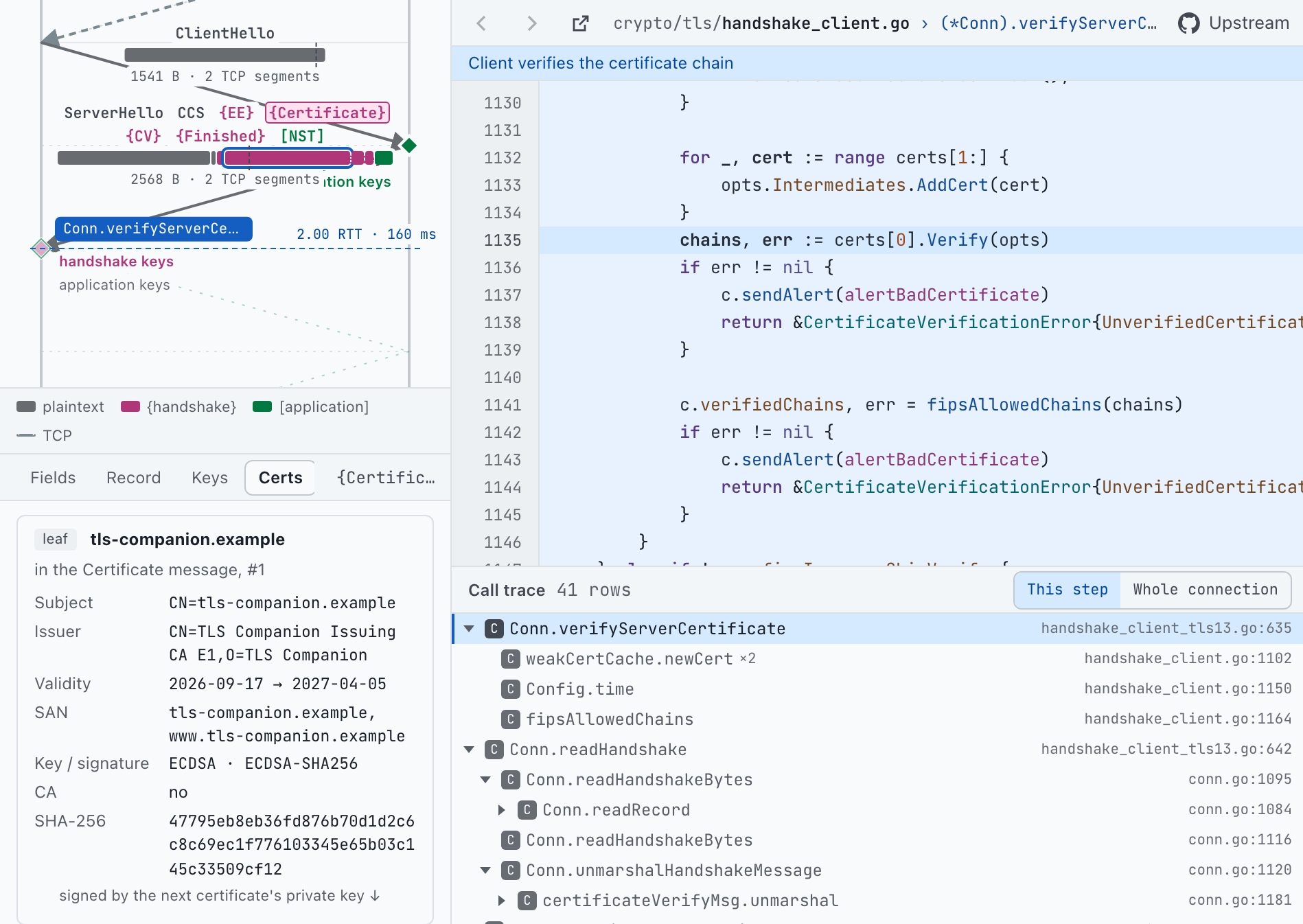
crypto/x509 on the right; every function the check entered below.The capture program generated a three-level chain: TLS Companion Root CA signs Issuing CA E1, which signs the leaf for tls-companion.example. All three use ECDSA keys and ECDSA-SHA256 signatures. Only the leaf and the intermediate travel in the Certificate message; the root is already in the client’s RootCAs. Verify follows the signatures from the leaf to that root, checks that each certificate is in its validity period and may authenticate a server, and checks that the leaf’s SAN contains the name the client asked for.
Certificates expire and recordings do not, so the capture fixed Config.Time at 2026-10-17 and issued the certificates around that day. Every replay verifies, whatever today’s date is. Chips under the chain open x509.Certificate.Verify, verifyServerCertificate itself and the path validation section of note T03.
Read it next to the eMudhra essay
Eight CA keys that fit in one byte tells the story of eight intermediate CA keys, trusted by every major platform, that turned out to be numbers below 256. Step 18 is where such a key would have been accepted. Every check in it concerns the certificates: signatures up the chain, dates, usage, the name. None of them can ask whether the issuer’s private key was ever secret, so a certificate signed with a recovered CA key passes all of them. The essay explains how browsers and platforms shut those keys out; the workbench shows what the client checks on its own, and links straight to step 18.
Notes, RFCs and search
Notes that link back to the steps
Fifteen notes cover one HTTPS request end to end, the cryptography, certificates, TLS 1.2 and 1.3 packet by packet, resumption and 0-RTT, ECH, QUIC, post-quantum TLS, engineering practice and observing TLS with openssl and curl, with an overview and a glossary. Every heading a workbench step cites links back to that step, and every RFC mention opens the RFC text in place.
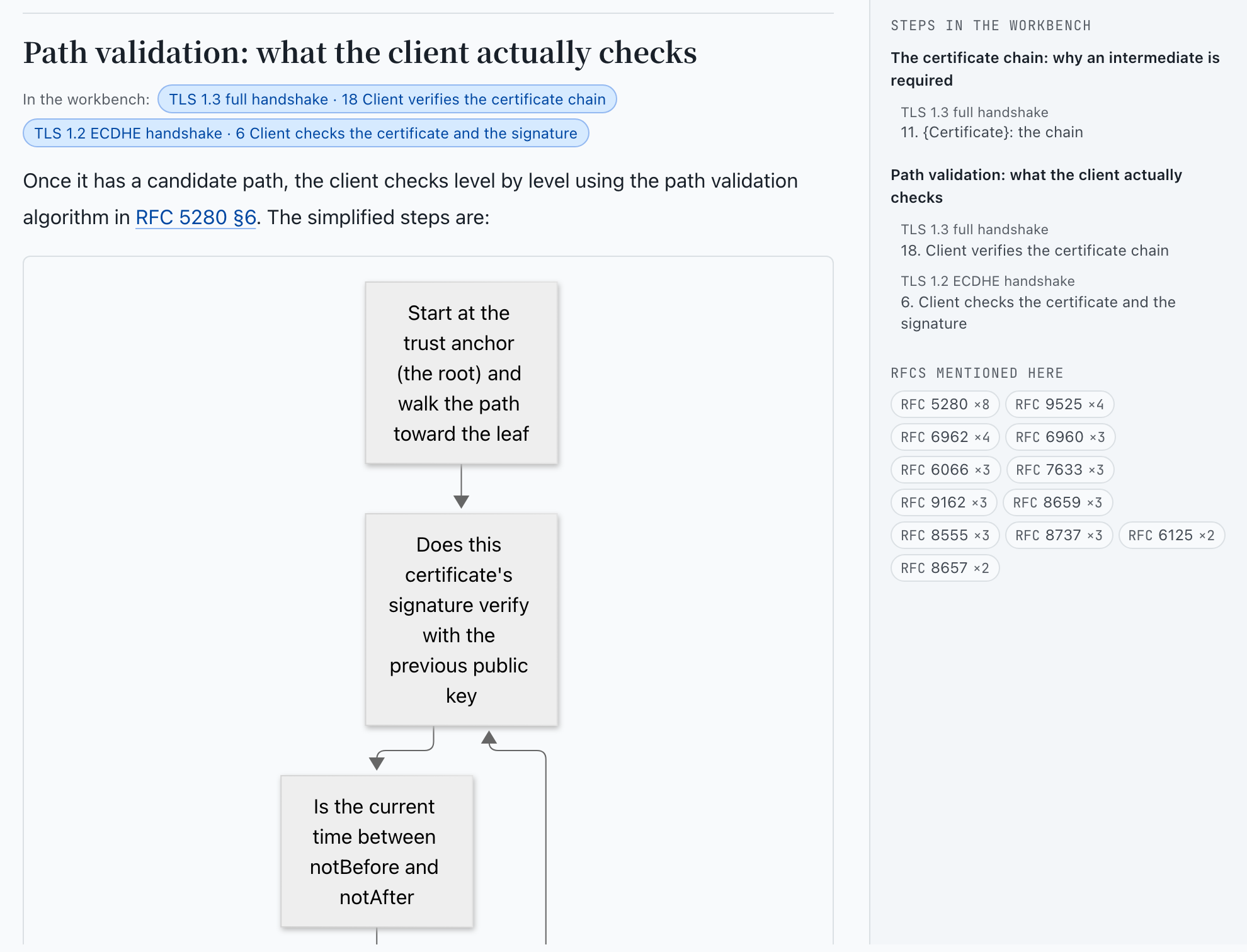
The RFC reader holds 40 RFCs as unpaginated text with cross-links, and for each section it lists the Go comments that cite it. The history page lays protocol versions, attacks and Go releases side by side in 34 entries; each shows how crypto/tls handles the problem today, and a Go release entry diffs the relevant file between two Go tags, fetched live from GitHub.
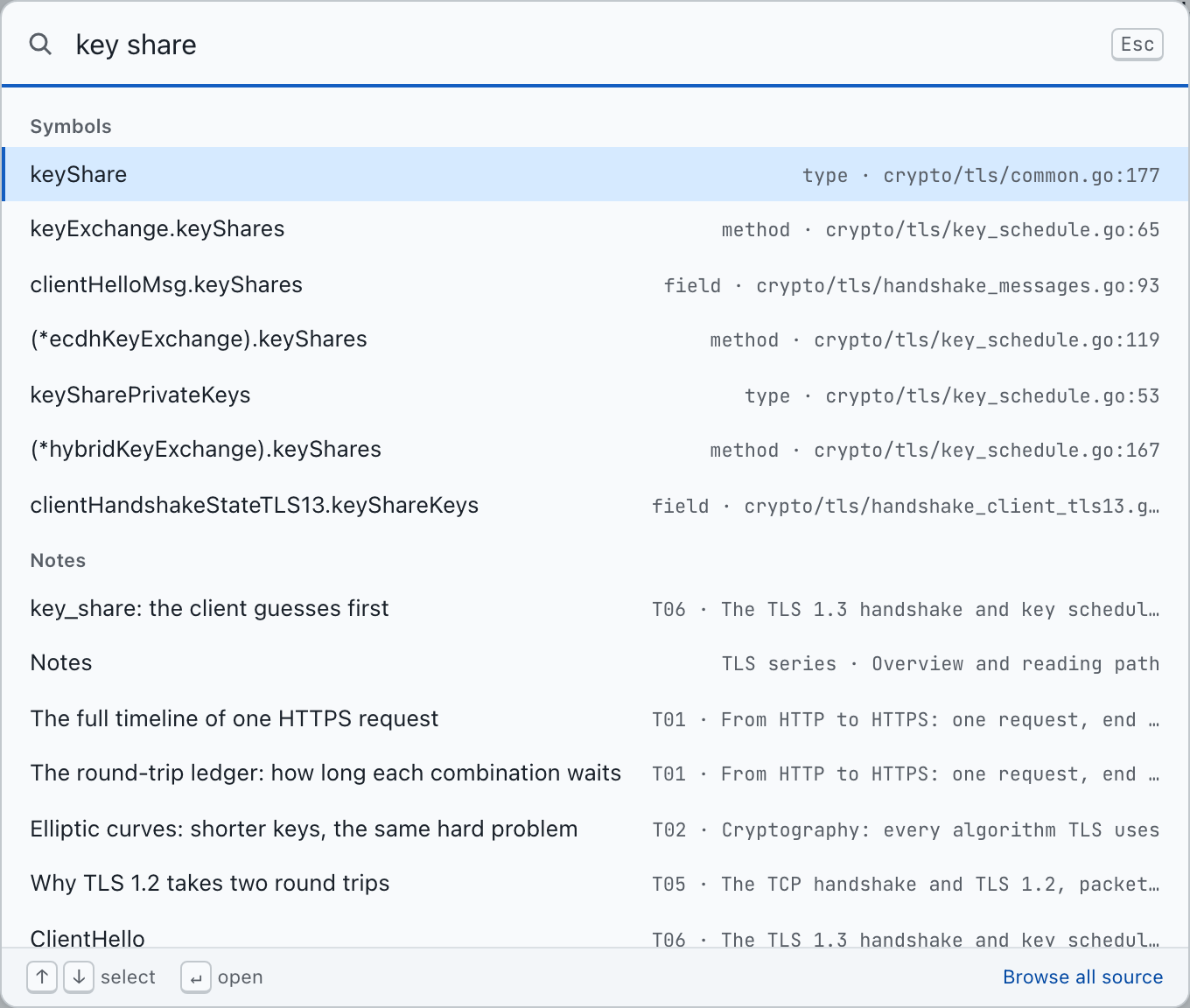
/ opens search over steps, Go symbols, files, notes and RFC sections. key_share, keyShare and “key share” count as the same query.On the keyboard and on a phone
The keyboard reaches everything. Left and Right change step and Space plays. The timeline takes the arrow keys, Shift with an arrow for larger jumps, Home and End. The field tree and the call trace are one tab stop each, moved through with the arrow keys. Tabbing into the code puts a cursor on the current line: Up and Down move it, Left and Right pick an identifier, Enter follows it to its definition.
Links to any step
Every view has its own address. Workbench links count steps from 1, so #/play/tls13-full/8 opens step 8, and links carry no language: a shared link opens in the reader’s own choice of English or Chinese.
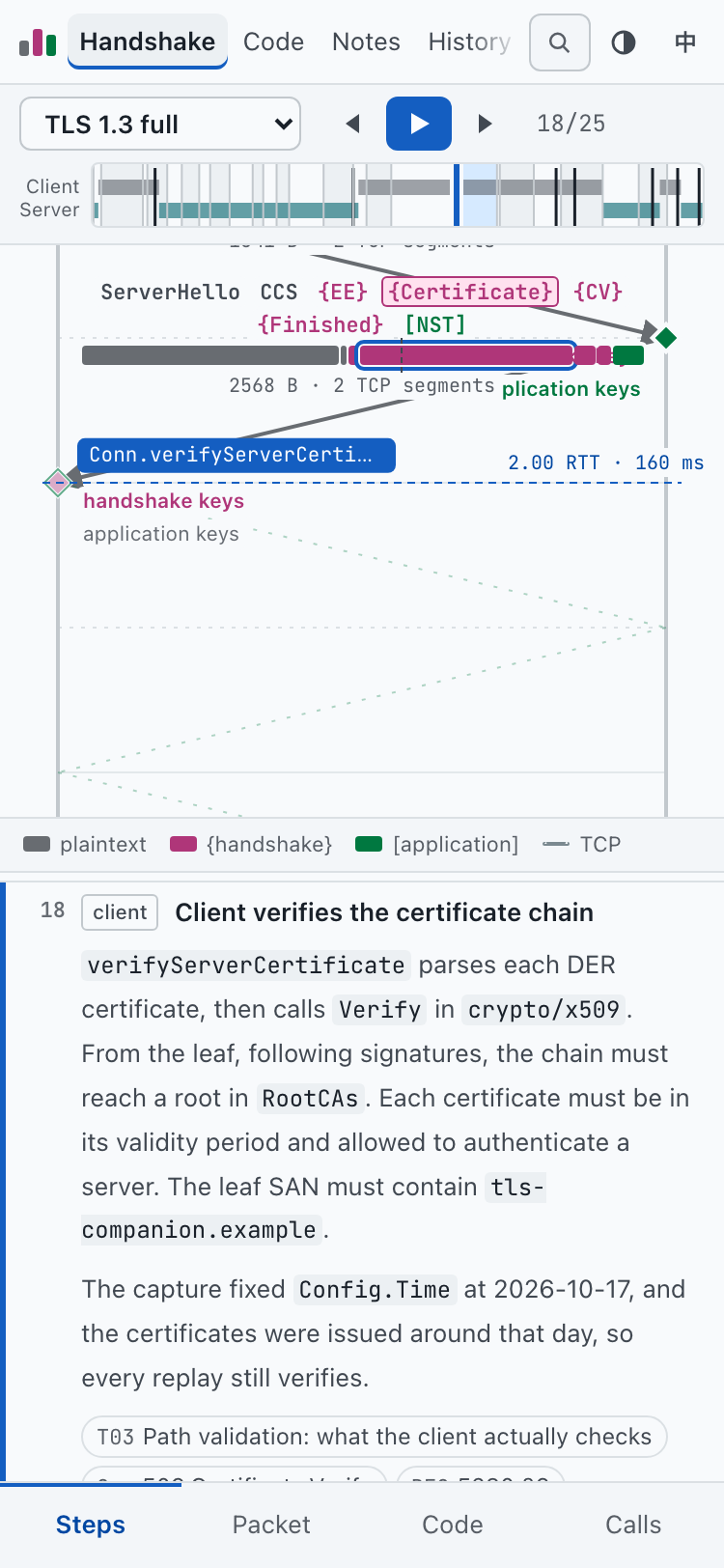
On a phone that is enough to replay a step someone sent you. For reading, the build also writes a static edition of the notes at /learn/en/ and /learn/zh/, plain HTML that works without JavaScript and links each note back to the workbench.
How it is built
The site is static and every piece of data in it is generated. Three Go programs make that data, and CI runs them again on every push.
Recording without forking Go
tlsinstrument writes a go build -overlay instead of patching the toolchain. It inserts a trace call right after the opening brace of every function in crypto/tls and in the FIPS 140 tls13 and tls12 packages, on the same line, so the upstream line numbers still hold. It also wraps HKDF-Extract, Derive-Secret, HKDF-Expand-Label and the TLS 1.2 PRF, so every derived secret is reported.
flowchart TD
  A[tlsinstrument] -->|overlay| B[tlscapture]
  B --> C[captures]
  D[tlsindex] --> E[code index]
  F[notes and RFCs] --> G[build scripts]
  C --> H[static site]
  E --> H
  G --> H
An instrumented function in the overlay looks like this; the rest of the file is untouched:
func (c *Conn) verifyServerCertificate(certificates [][]byte) error { defer tlscTraceEnter("crypto/tls.Conn.verifyServerCertificate")();tlscapture builds against that overlay and runs each scenario over an in-memory pipe whose mutex is passed between the endpoints like a baton: an endpoint holds it while it runs and gives it up only while it waits for bytes, so the two sides’ calls interleave in causal order. Then the capture decrypts every record from the key log with its own HKDF and PRF code, and fails if its keys differ from the ones crypto/tls derived. The addresses on screen, 192.0.2.10 and 198.51.100.20, come from the ranges reserved for documentation.
tlsindex type-checks crypto/tls and its dependencies from the toolchain’s own source and writes the semantic tokens, definitions, references and call edges the code browser runs on: 79 files and 30,064 lines, with go-to-definition, hover documentation and, for each function, where it ran in the recordings.
Steps never name line numbers. Each one anchors on a function and, where needed, a piece of its text:
{
  id: "client-cert",
  title: "Client verifies the certificate chain",
  side: 0,
  at: { enter: T + "Conn.verifyServerCertificate" },
  code: { fn: T + "Conn.verifyServerCertificate", find: "Verify(opts)" },
  msg: { dir: 1, type: 11 },
  tab: "certs",
  // then body: the narration, and refs: note sections, RFC sections, symbols
}
pnpm test resolves every anchor, symbol, note heading and RFC section against the generated data. A Go release that renames a function fails the build and names the step to fix, which is the whole upgrade procedure: change the version in the Pages workflow and tools/go.mod, run pnpm data && pnpm test, and fix what the test names. The same test fails if the English notes drift from the Chinese originals in file names, note IDs or headings, because switching language and the links from steps into notes depend on them.
The site is React and TypeScript built with Vite, on GitHub Pages. Its design notes set one test for the layout: from any byte on the wire, reach the line of Go that wrote it and the RFC section that defines it in two clicks, and get back without losing your place.
Limits
The recordings are fixed. You cannot point TLS Companion at your own server; it shows five connections that Go made with itself over an in-memory pipe, and the TCP handshake on the diagram is drawn, not captured. It shows one implementation, Go’s, and other TLS libraries make other choices. Topics outside those five connections, such as ECH and QUIC, appear in the notes but not in the workbench.
The data is reproducible in meaning, not in bytes. Every build runs fresh handshakes with new randomness, so the random values, keys and timestamps you see change with each deploy, while the steps, links and their content stay the same.
The workbench is built for a desktop; a phone can replay a step, but the dense panels want a wide screen. The two languages are kept in step by hand, with the test above as the guard.
Getting started
- Open a step. Start at step 1 of the TLS 1.3 handshake and press Right. Press
/whenever you want to find a symbol, a note or an RFC section. - Read first if TLS is new to you. “Start with the overview” on the home page opens the reading path through the notes, and every note links to the steps that show it.
- Run it yourself. You need Go 1.26.1 and Node 24 with pnpm. The data step indexes
crypto/tls, records the handshakes and builds the notes and RFCs.
$ pnpm install
$ pnpm data     # index crypto/tls, record handshakes, build notes and RFCs
$ pnpm test     # check every step, history entry and dissector against the data
$ pnpm dev      # http://localhost:5173/tls-companion/
The code in src/, tools/ and scripts/ is MPL-2.0: usable in other projects, closed-source ones included, but a file from this repository that you change and distribute stays MPL-2.0. The notes are CC BY-NC-SA 4.0. The Go source on the site is the Go project’s, under its BSD-style license, and the RFC text belongs to the IETF Trust and the authors.
- Live: lr00rl.github.io/tls-companion
- Source: github.com/lr00rl/tls-companion (MPL-2.0; the notes are CC BY-NC-SA 4.0)